> For the complete documentation index, see [llms.txt](https://support.attackforge.com/llms.txt). Markdown versions of documentation pages are available by appending `.md` to page URLs; this page is available as [Markdown](https://support.attackforge.com/release-notes/2026.md).
# 2026
## 02 October 2026
### See Related Data Across Your Projects
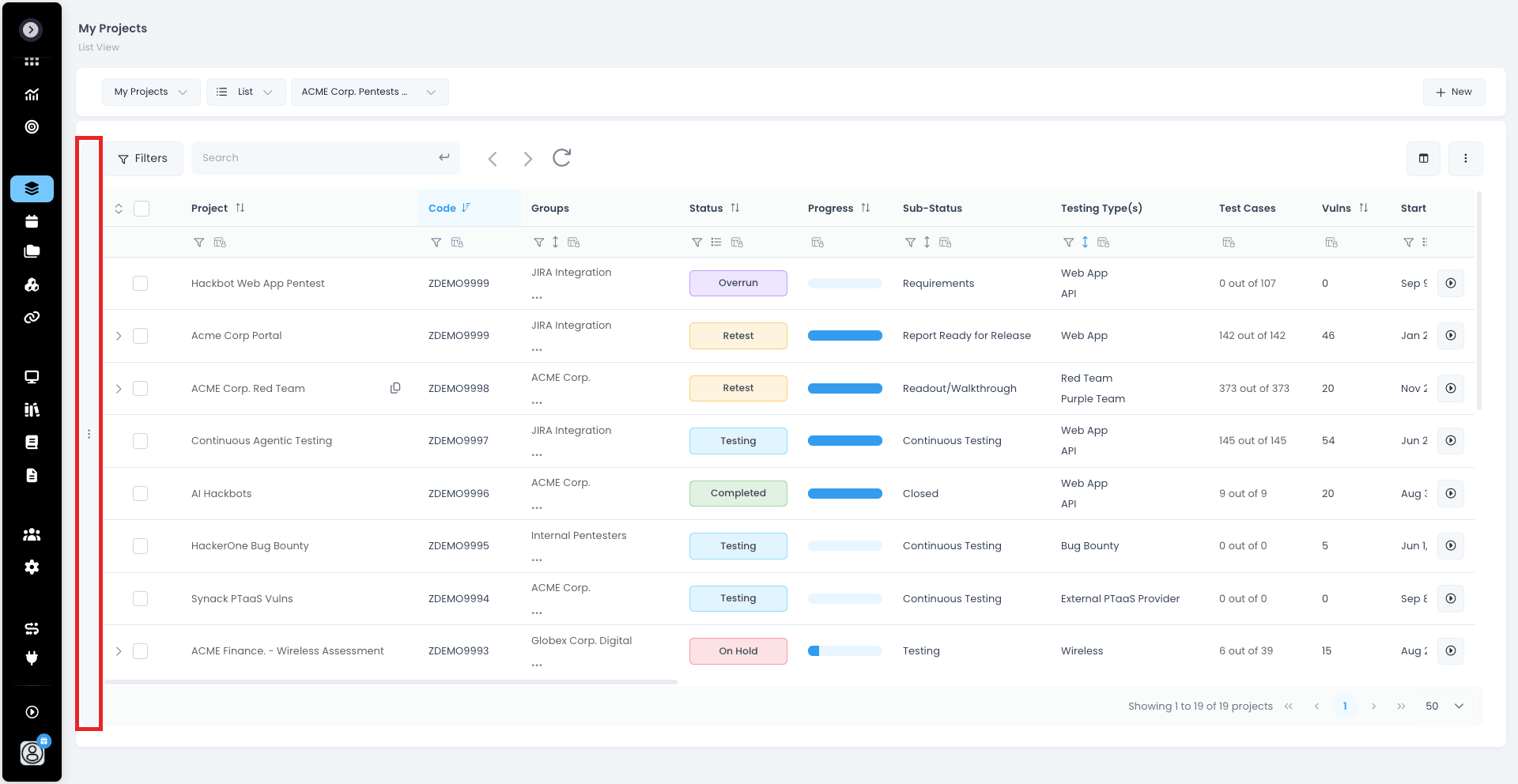
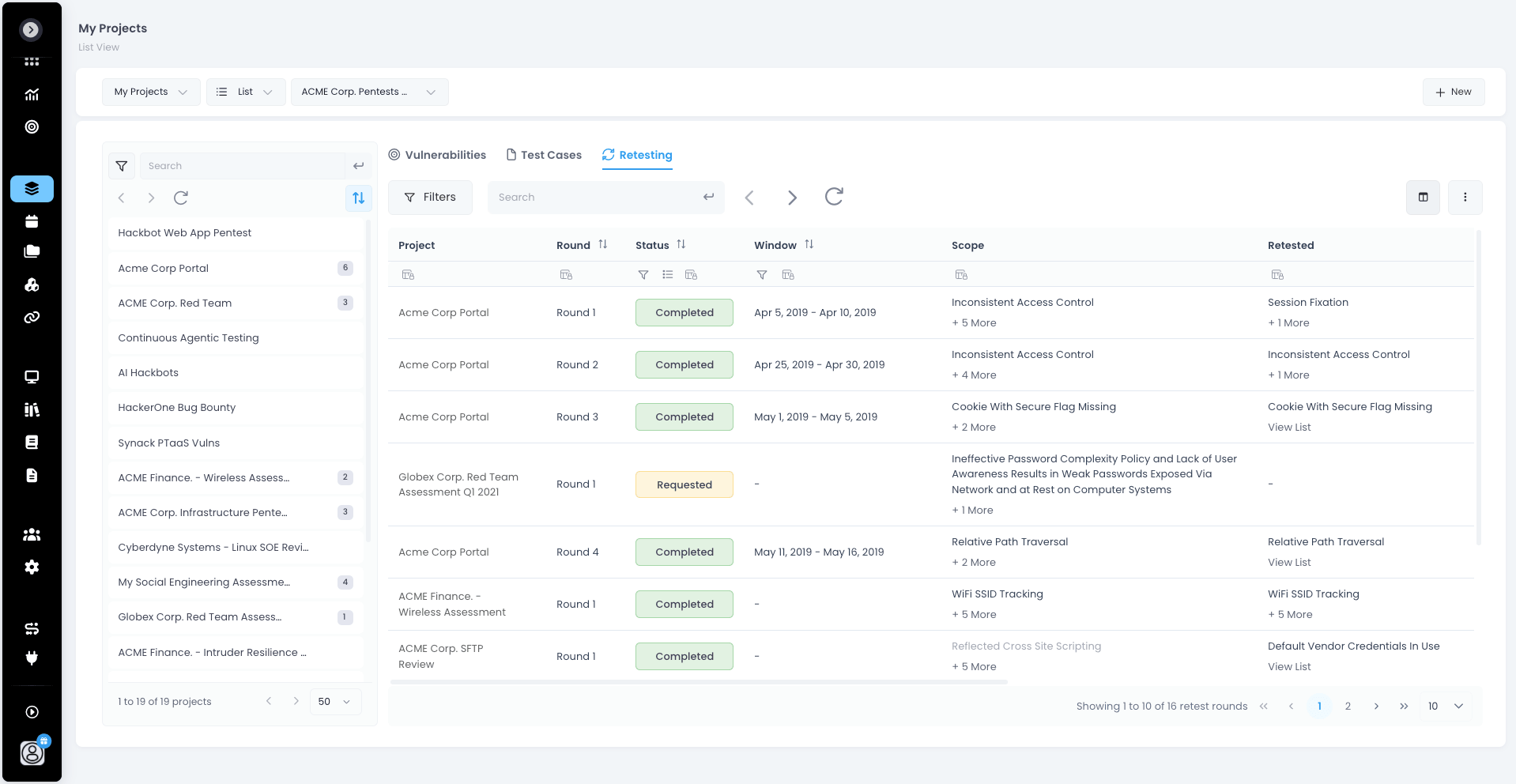
Your project lists now open into a details view. Select one or more projects and the pane beside them lists their vulnerabilities, test cases or retest rounds — across every project you selected, in one table. Select nothing and you see the related data for every project your current filters match. 🚀
Click the handle on the left edge of any projects table to open it. The table folds into a compact list that maintains your filters, search and sorting, so you can keep narrowing projects while you browse what belongs to them.
* 🎯 *Vulnerabilities tab* — every vulnerability across the selected projects, with the same filters, columns, saved views and export you have on a single project
* 📄 *Test Cases tab* — test cases across projects with status, outcome, assignee, assigned assets and your custom fields
* 🔄 *Retesting tab* — every retest round across the selected projects with its project, window, scope and retested vulnerabilities
* 🧭 *Compact project list* — filter, search, sort and page without leaving the details view
Each tab remembers its own columns and layout, so `Groups`, `Portfolios`, `Streams` and your own project lists can each be set up the way that suits them.
Available on `My Projects`, `User Projects`, `Archived Projects` and the projects tab of `Groups`, `Portfolios` and `Streams`.
### Code Workbench Improvements
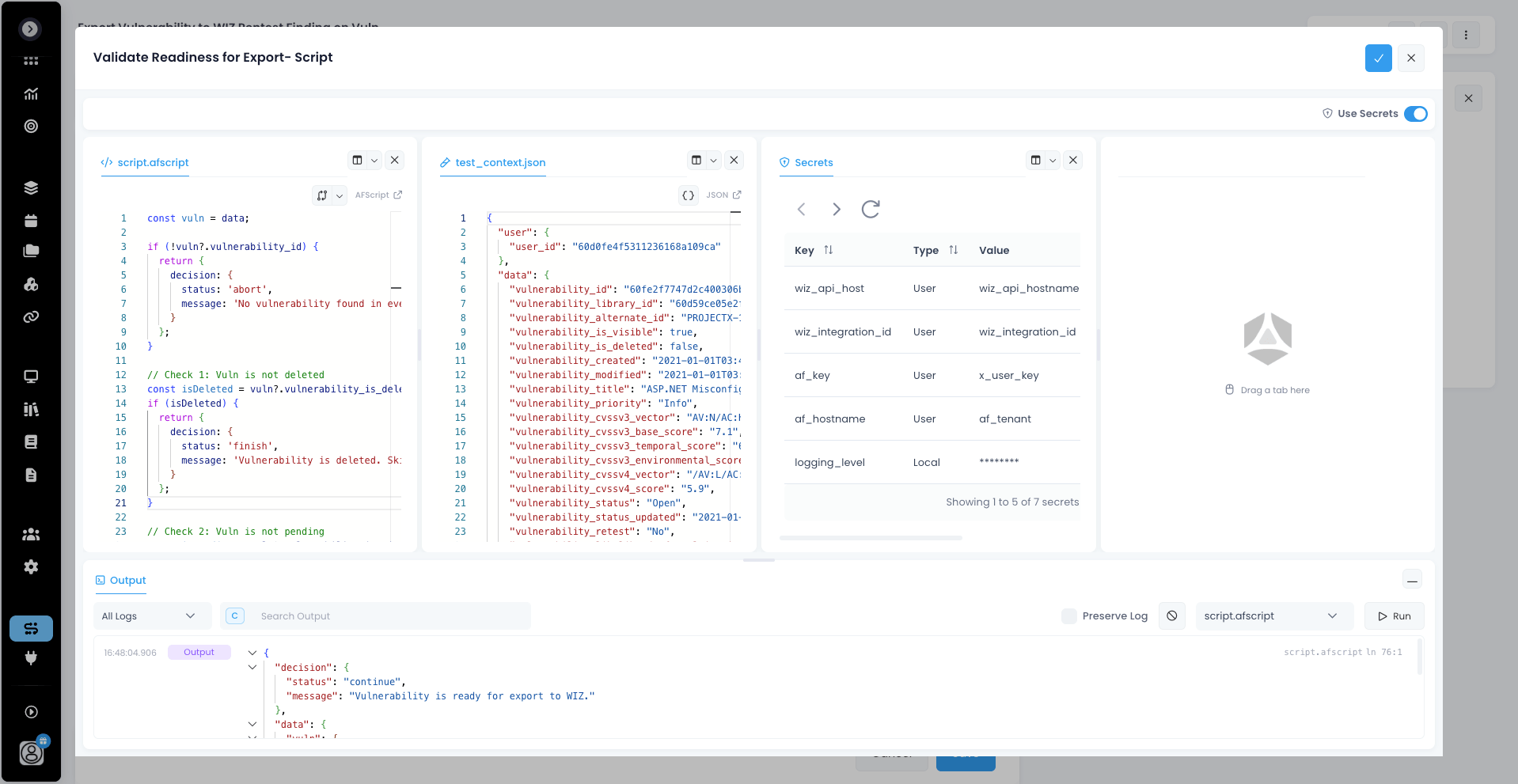
Every place you write a script, template or expression in AttackForge - it now opens in the same workbench, in a layout you can rearrange to suit the job. 🧑💻
* 🧩 *Split and arrange tabs* — drag tabs into side-by-side groups and keep the test context next to the script that uses it
* 📐 *Resizable output* — drag the output panel to the height you need, or minimise it until the next run 🔍 *Filter the output* — narrow by log level or search text, with a timestamp on every row
* 🔀 *See what changed* — toggle a diff against the last saved version, inline or side by side, before you accept
* 📍 *Jump to the source* — every log, error and result shows where it came from; click it to go straight to that line
Open any script editor from the Administration module, a Flow action or a custom field to try it out. ⚡
### AFScript - The Biggest Language Upgrade Yet!
A whole new way to write AFScript just landed 🎉
* ⚡ *\~25× faster interpreter*
* ✨ *Modern syntax*: closures, arrows, template strings, switch, for…of / for…in, spread, destructuring
* 📚 *19 new built-ins*
✨ Write Cleaner Scripts
```
// Arrows + closures
const counter = () => { let n = 0; return () => ++n; };
// Template strings
`https://${host}:${port}/`;
// Destructuring with defaults
const { title, severity = 'Info' } = finding;
// Spread
({ ...base, severity: 'High' });
// Loop with index, no counter needed
for (const vuln of vulnerabilities) { ... }
for (const [i, row] of Array.entries(rows)) { ... }
```
Plus switch with fall-through, for…of over arrays and strings (emoji-safe 😀), for…in over object keys, and one-line swaps with \[a, b] = \[b, a].
📚 *New Built-ins*
* 🗂️ *Array*: forEach, filter, from, of, fill, findLast, findLastIndex, entries, keys, values
* 🔤 *String*: at, charAt, concat, indexOf, lastIndexOf, repeat, search
* 🎲 *Math*: secureRandom() and secureRandomInt(min, max) for cryptographically secure, unbiased randomness
All 144 built-ins are now documented with examples on the [AFScript Support Page](https://support.attackforge.com/app/afscript)💪
Check out the features, then enjoy faster and better AFScript! 🎉
### Flow Runs Improvements
Understanding and tracking your Flows is now easier than ever. 🚀
*What's new*:
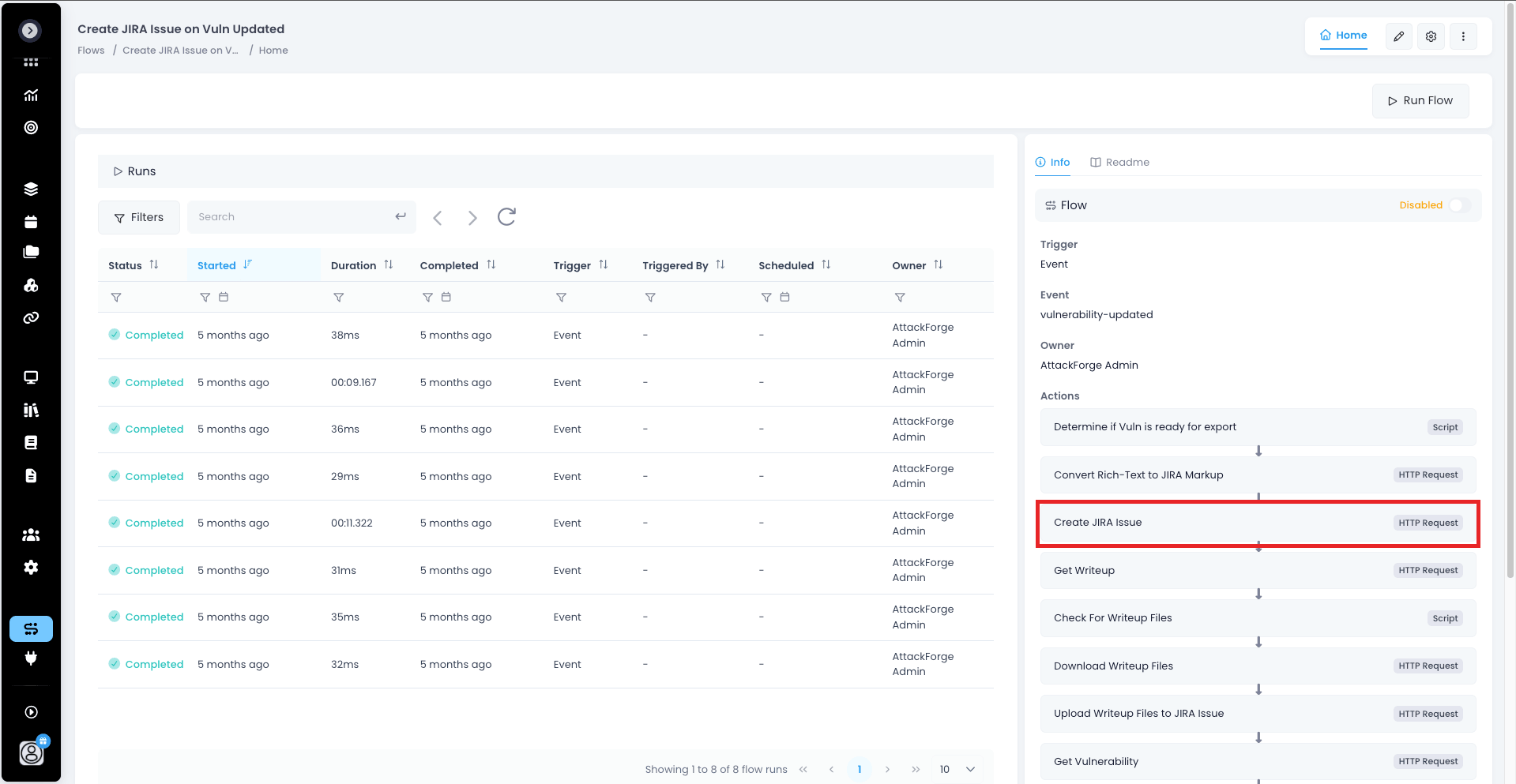
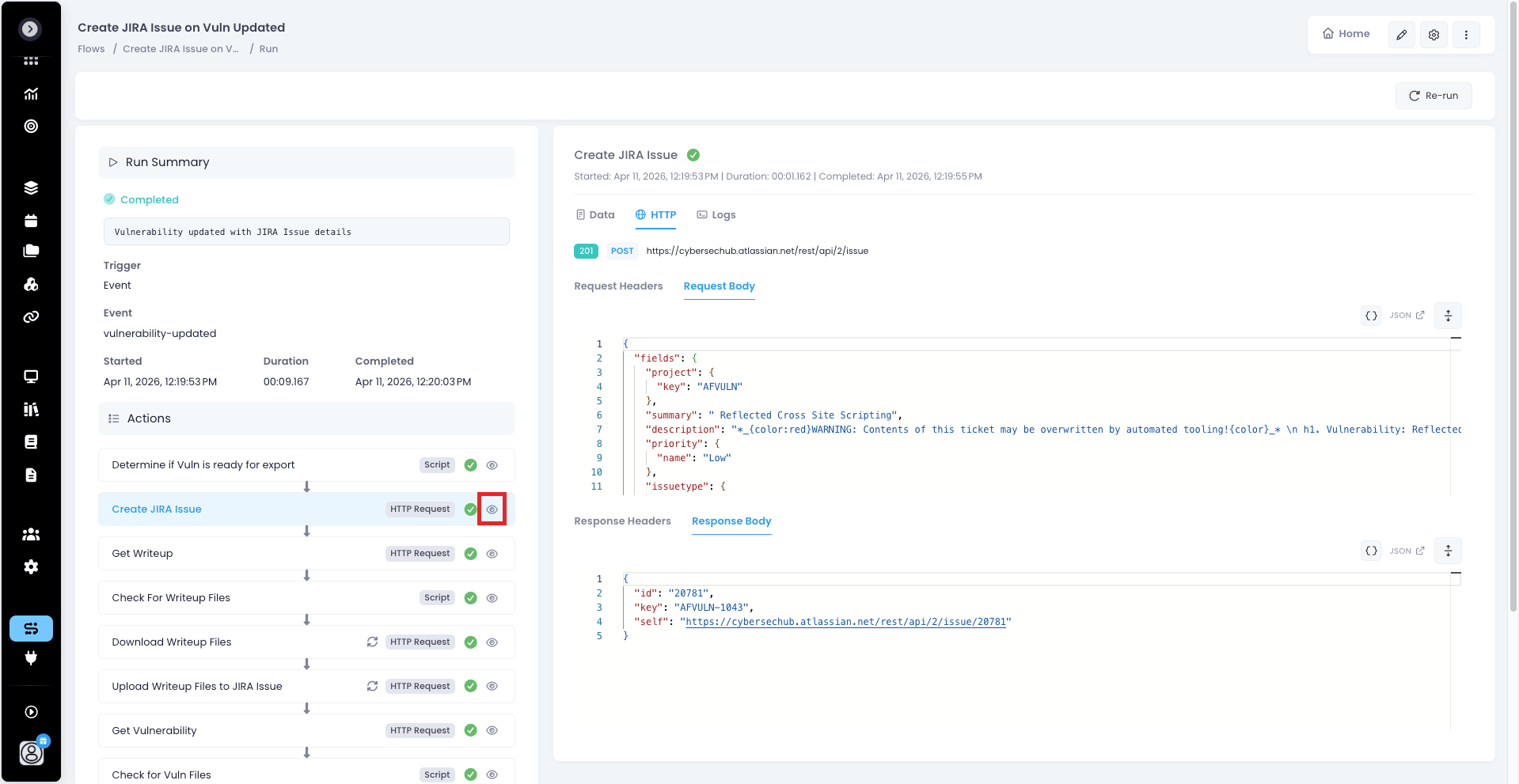
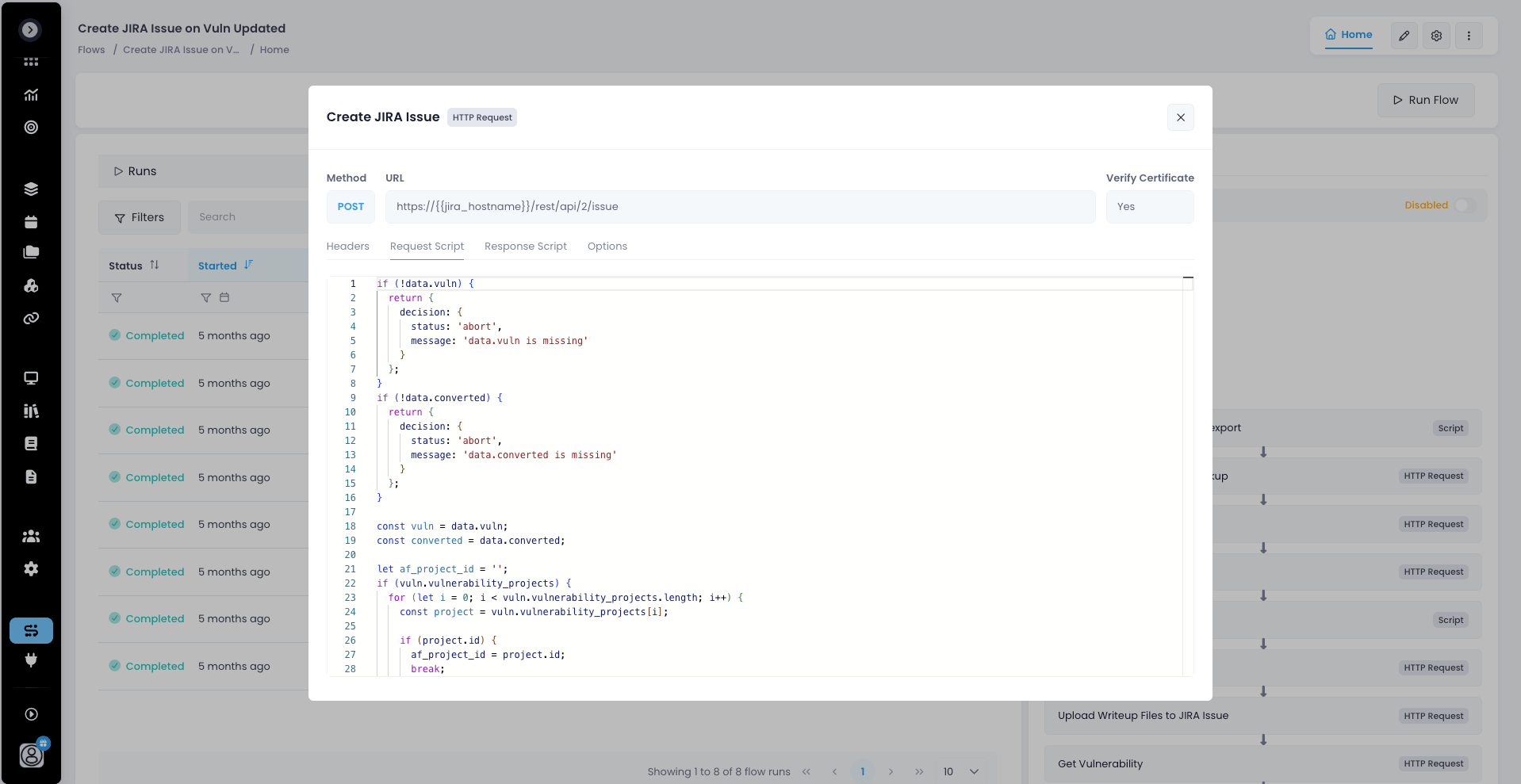
🧩 Action Details Modal See exactly what each action does without leaving the page. Open the new action details modal from the Flow page or a Flow run page to view the full script or HTTP request configuration behind it.
* ✅ Review logic at a glance
* ✅ Debug runs faster by seeing exactly what was executed
* ✅ Confirm configuration without digging through the editor
🔎 *Search Your Flow Runs*
The Flow runs table now has a search input, so you can find the run you need in seconds. Search by:
* 📛 Flow name
* 👤 Owner
* ⚡ Triggering user
*Why it matters*: Whether you're troubleshooting a failed run, auditing automation activity or checking who kicked off a Flow, you'll get answers faster with less clicking around. ⏱️
### Run Self-Service API Requests as Another User
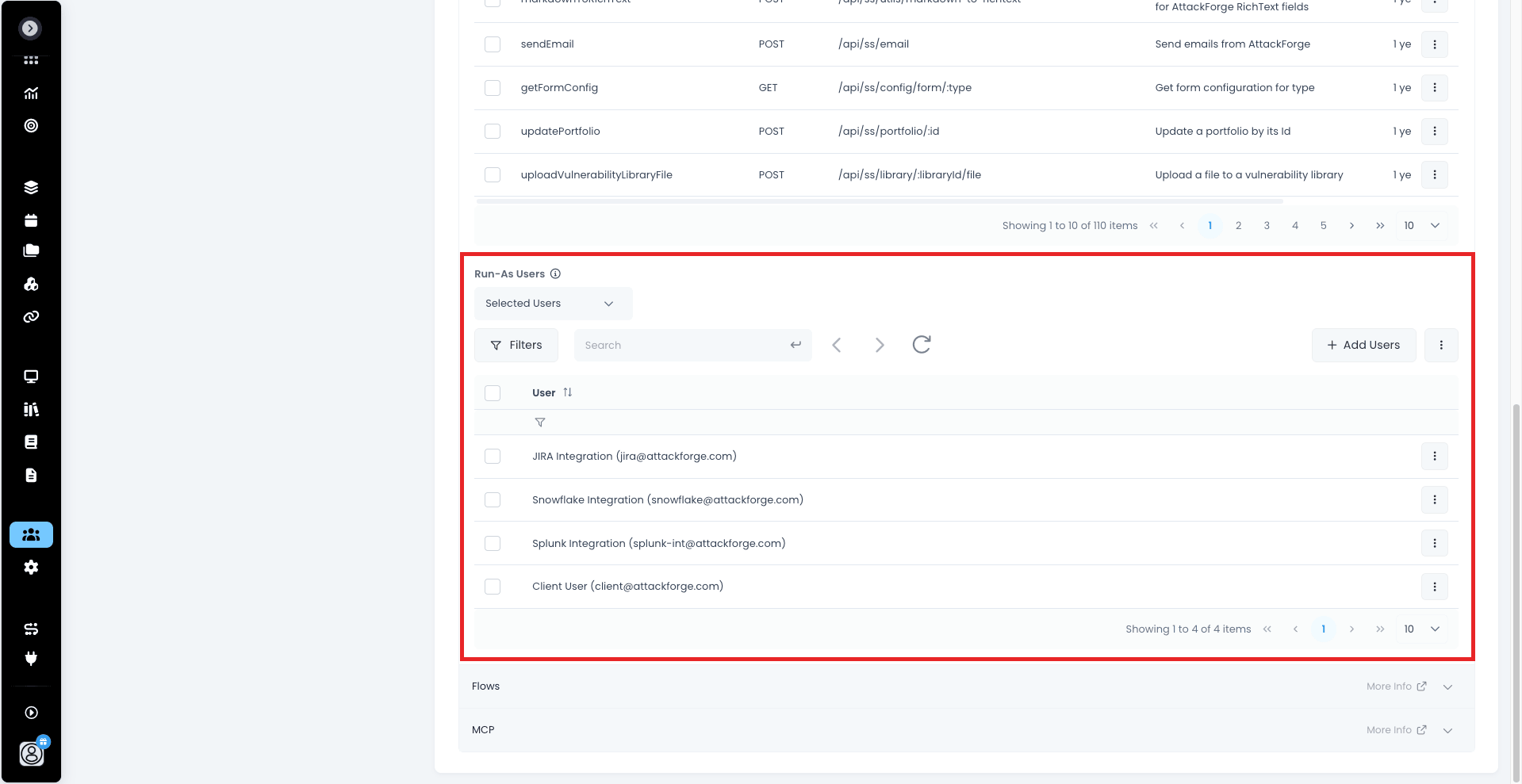
🎭 Administrators can now make Self-Service API requests on behalf of another user. Perfect for automation, troubleshooting and acting on someone's behalf without sharing credentials. 🚀
*How it works*:
* 👥 *Add your Run-As Users*. Head to `Users > Access > Self Service RESTful API > Run-As Users` and add the users you need.
* 📨 *Send the header*. Include `x-run-as-user-id` alongside your API key, and the request runs as that user.
* 🔑 *Grab the ID in a click*. Hover over a user in the table to copy their `System ID`, ready to drop straight into the header.
*Secure by design*: 🛡️
* ✅ Requests are limited to the API methods the user already has access to, so no extra permissions, ever.
* ✅ Only non-admin users can be added as Run-As Users.
*Why it matters*: Build integrations and workflows that respect each user's real access, test exactly what a user can see and do, and keep permissions tight, all from a single admin API key. ⚡
### Smarter Actions
Your Actions keep getting sharper. 👾
* 👁️ *Hide conditions on form fields* — show a field only when it's relevant, with AFScript available for the conditions that need real logic
* 💡 *Suggested values* — give users a head start with pre-filled suggestions on form fields
* 🔎 *View action details* — open any action from the Flow page or a Flow run to see exactly what it's configured to do, script or HTTP request
* ✍️ *Smarter AFScript autocomplete* — completions now walk into nested context properties such as `form.custom_fields[0].value.`, with hover documentation on library functions
### Affected Asset Components Get Their Own Table
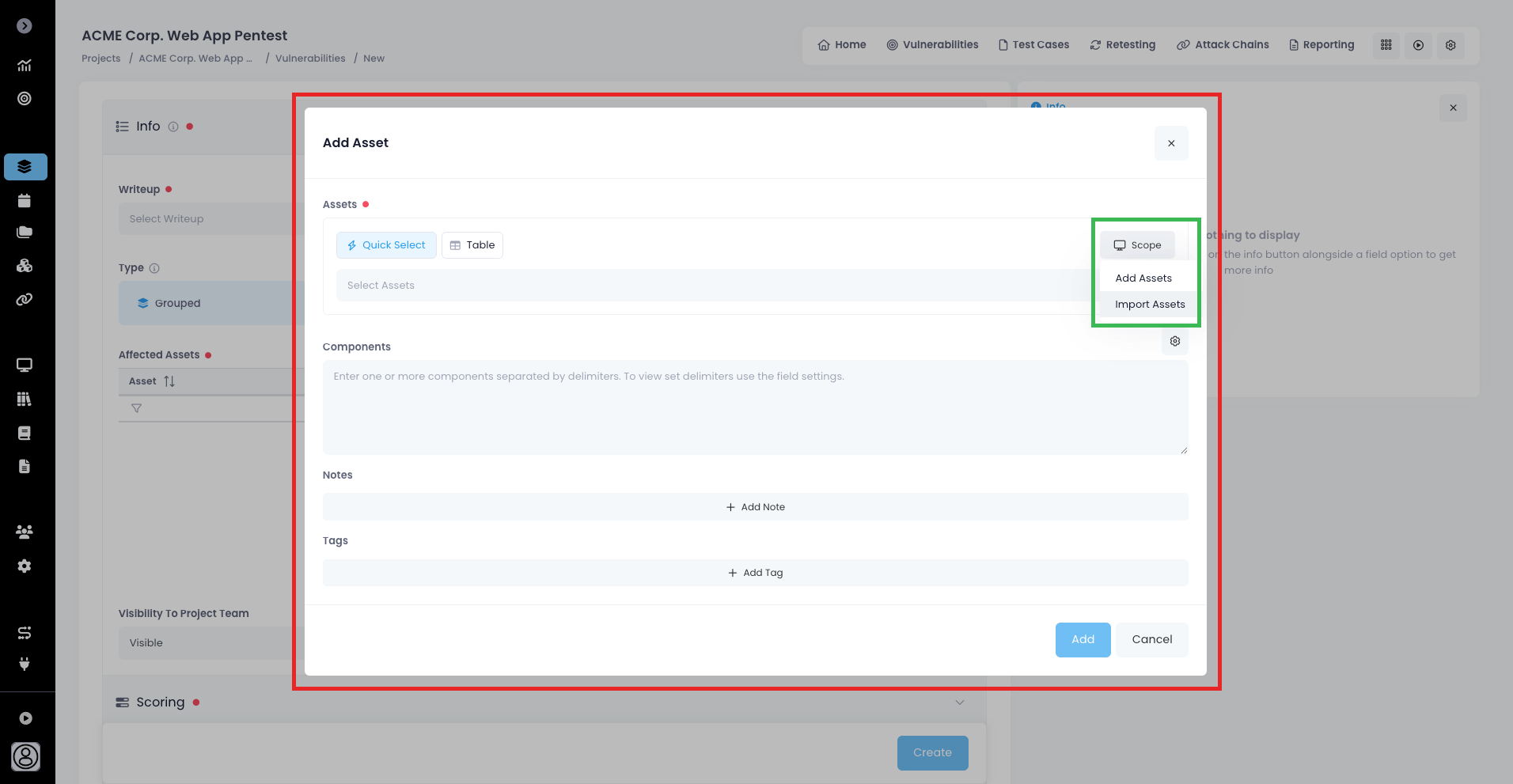
Affected asset components now appear in a proper table wherever you view or edit an asset, so `Actioned`, `Notes` and `Tags` are visible at a glance instead of tucked inside a panel per component. 🧱
* 🔎 *Sort, filter and group* — sort by Component or Actioned, filter any column, and group by Actioned to see what still needs work
* 🖱️ *Click a row for the details* — open any component in its own view, or in its own edit form from Edit Asset
* ✅ *Bulk actions* — select several components and use `Actions > Update Actioned`, `Add Notes`, `Add Tags` or `Delete` in one go
### Duplicate Configuration Instead of Rebuild
Building forms just got a lot faster. Anywhere you configure fields, you can now copy an existing one and tweak it instead of starting over. 📋
* *Custom fields* — Duplicate any field to get a copy right below it, ready to edit
* *Sections* — duplicate a whole section and every field inside it comes along
* *Table columns* — copy a column in a table custom field, options and defaults included
* *Field options* — `Actions > Duplicate` on any option in a select field
And when a long option list needs trimming, tick the options you want gone and remove them together. ✨
### Login Links That Pick the Right SSO
If your tenant has more than one single sign-on provider, you can now send someone a link that takes them straight to the right one. Add `?sso=1` or `?sso=2` to the login URL, or to any page in AttackForge, and they'll be signed in through that provider and land where the link pointed. 🔗
Perfect for onboarding a client onto their own identity provider, or pointing a colleague at a finding without the detour.
### Performance Improvements
We've been under the hood tuning performance, and the result is a noticeably faster initial load. 🚀
What's new: 🏎️ Quicker start-up. The app now loads faster when you first open it, so you spend less time waiting and more time testing. 🎯 Straight to work. Jump into your projects, findings and reports with less delay. ✨ A smoother experience. Optimisations behind the scenes make the whole platform feel snappier from the moment you log in.
Why it matters: Every second counts during an engagement. Faster load times mean less friction for your testers, reviewers and clients, and a smoother start to every session. ⏱️
No action needed. Just log in and feel the difference! 💨
### Integrations and Automations Updates
We're always improving our *Self-Service APIs*, *Events* and *MCP Tools* to make automations and integrations even easier! 💪
#### New MCP Tools
* [**CountUsers**](https://support.attackforge.com/app/modules/ai-mcp-and-skills/count-users)
* [**FindUsers**](https://support.attackforge.com/app/modules/ai-mcp-and-skills/find-users)
* [**CreateUser**](https://support.attackforge.com/app/modules/ai-mcp-and-skills/create-user)
* [**PatchUser**](https://support.attackforge.com/app/modules/ai-mcp-and-skills/patch-user)
* [**DeleteUser**](https://support.attackforge.com/app/modules/ai-mcp-and-skills/delete-user)
* [**RestoreUser**](https://support.attackforge.com/app/modules/ai-mcp-and-skills/restore-user)
* [**CreateGroup**](https://support.attackforge.com/app/modules/ai-mcp-and-skills/create_group)
* [**PatchGroup**](https://support.attackforge.com/app/modules/ai-mcp-and-skills/patch_group)
* [**ArchiveGroup**](https://support.attackforge.com/app/modules/ai-mcp-and-skills/archive_group)
* [**RestoreGroup**](https://support.attackforge.com/app/modules/ai-mcp-and-skills/restore_group)
* [**FindGroups**](https://support.attackforge.com/app/modules/ai-mcp-and-skills/find_groups)
* [**CountGroups**](https://support.attackforge.com/app/modules/ai-mcp-and-skills/count_groups)
* [**FindGroupMembers**](https://support.attackforge.com/app/modules/ai-mcp-and-skills/find_group_members)
* [**PatchGroupMembers**](https://support.attackforge.com/app/modules/ai-mcp-and-skills/patch_group_members)
* [**FindGroupMemberAdmins**](https://support.attackforge.com/app/modules/ai-mcp-and-skills/find_group_member_admins)
* [**PatchGroupMemberAdmins**](https://support.attackforge.com/app/modules/ai-mcp-and-skills/patch_group_member_admins)
* [**FindGroupProjectRequests**](https://support.attackforge.com/app/modules/ai-mcp-and-skills/find_group_project_requests)
* [**PatchGroupProjectRequests**](https://support.attackforge.com/app/modules/ai-mcp-and-skills/patch_group_project_requests)
* [**FindProjectMembers**](https://support.attackforge.com/app/modules/ai-mcp-and-skills/find_project_members)
* [**PatchProjectMembers**](https://support.attackforge.com/app/modules/ai-mcp-and-skills/patch_project_members)
* [**FindProjectMemberAdmins**](https://support.attackforge.com/app/modules/ai-mcp-and-skills/find_project_member_admins)
* [**PatchProjectMemberAdmins**](https://support.attackforge.com/app/modules/ai-mcp-and-skills/patch_project_member_admins)
* [**FindProjectGroups**](https://support.attackforge.com/app/modules/ai-mcp-and-skills/find_project_groups)
* [**PatchProjectGroups**](https://support.attackforge.com/app/modules/ai-mcp-and-skills/patch_project_groups)
* [**FindPortfolioStreams**](https://support.attackforge.com/app/modules/ai-mcp-and-skills/find_portfolio_streams)
* [**FindProjectPortfolioStreams**](https://support.attackforge.com/app/modules/ai-mcp-and-skills/find_project_portfolio_streams)
* [**PatchProjectPortfolioStreams**](https://support.attackforge.com/app/modules/ai-mcp-and-skills/patch_project_portfolio_streams)
* [**ArchiveProject**](https://support.attackforge.com/app/modules/ai-mcp-and-skills/archive_project)
* [**RestoreProject**](https://support.attackforge.com/app/modules/ai-mcp-and-skills/restore_project)
#### New REST APIs
* [**GetProjectVulnerabilityReviewNotes**](https://support.attackforge.com/app/modules/self-service-restful-api/GetProjectVulnerabilityReviewNotes)
* [**GetProjectVulnerabilitiesReviewNotes**](https://support.attackforge.com/app/modules/self-service-restful-api/GetProjectVulnerabilitiesReviewNotes)
* [**GetProjectTestCaseReviewNotes**](https://support.attackforge.com/app/modules/self-service-restful-api/GetProjectTestCaseReviewNotes)
* [**GetProjectTestCasesReviewNotes**](https://support.attackforge.com/app/modules/self-service-restful-api/GetProjectTestCasesReviewNotes)
* [**GetProjectSummaryPageReviewNotes**](https://support.attackforge.com/app/modules/self-service-restful-api/GetProjectSummaryPageReviewNotes)
* [**GetProjectReportingReviewNotes**](https://support.attackforge.com/app/modules/self-service-restful-api/GetProjectReportingReviewNotes)
* [**GetTestSuiteTestCaseReviewNotes**](https://support.attackforge.com/app/modules/self-service-restful-api/GetTestSuiteTestCaseReviewNotes)
* [**GetTestSuiteTestCasesReviewNotes**](https://support.attackforge.com/app/modules/self-service-restful-api/GetTestSuiteTestCasesReviewNotes)
* [**GetVulnerabilityLibraryReviewNotes**](https://support.attackforge.com/app/modules/self-service-restful-api/GetVulnerabilityLibraryReviewNotes)
* [**UpdateUserRole**](https://support.attackforge.com/app/modules/self-service-restful-api/UpdateUserRole)
* [**PatchUserFlowTriggerAccess**](https://support.attackforge.com/app/modules/self-service-restful-api/PatchUserFlowTriggerAccess)
* [**GetUserRunAsUsers**](https://support.attackforge.com/app/modules/self-service-restful-api/GetUserRunAsUsers)
* [**UpdateUserRunAsUsers**](https://support.attackforge.com/app/modules/self-service-restful-api/UpdateUserRunAsUsers)
* [**GetAvailableDelegations**](https://support.attackforge.com/app/modules/self-service-restful-api/GetAvailableDelegations)
* [**GetUserDelegations**](https://support.attackforge.com/app/modules/self-service-restful-api/GetUserDelegations)
* [**UpdateUserDelegations**](https://support.attackforge.com/app/modules/self-service-restful-api/UpdateUserDelegations)
* [**GetAvailableRESTfulAPIMethods**](https://support.attackforge.com/app/modules/self-service-restful-api/GetAvailableRESTfulAPIMethods)
* [**GetUserRESTfulAPIMethods**](https://support.attackforge.com/app/modules/self-service-restful-api/GetUserRESTfulAPIMethods)
* [**UpdateUserRESTfulAPIMethods**](https://support.attackforge.com/app/modules/self-service-restful-api/UpdateUserRESTfulAPIMethods)
* [**GetAvailableEvents**](https://support.attackforge.com/app/modules/self-service-restful-api/GetAvailableEvents)
* [**GetUserEvents**](https://support.attackforge.com/app/modules/self-service-restful-api/GetUserEvents)
* [**UpdateUserEvents**](https://support.attackforge.com/app/modules/self-service-restful-api/UpdateUserEvents)
* [**GetAvailableMCPTools**](https://support.attackforge.com/app/modules/self-service-restful-api/GetAvailableMCPTools)
* [**GetUserMCPTools**](https://support.attackforge.com/app/modules/self-service-restful-api/GetUserMCPTools)
* [**UpdateUserMCPTools**](https://support.attackforge.com/app/modules/self-service-restful-api/UpdateUserMCPTools)
* [**GetGroupFlowTriggerAccess**](https://support.attackforge.com/app/modules/self-service-restful-api/GetGroupFlowTriggerAccess)
* [**PatchGroupFlowTriggerAccess**](https://support.attackforge.com/app/modules/self-service-restful-api/PatchGroupFlowTriggerAccess)
* [**GetGroupRESTfulAPIMethods**](https://support.attackforge.com/app/modules/self-service-restful-api/GetGroupRESTfulAPIMethods)
* [**UpdateGroupRESTfulAPIMethods**](https://support.attackforge.com/app/modules/self-service-restful-api/UpdateGroupRESTfulAPIMethods)
* [**GetGroupEvents**](https://support.attackforge.com/app/modules/self-service-restful-api/GetGroupEvents)
* [**UpdateGroupEvents**](https://support.attackforge.com/app/modules/self-service-restful-api/UpdateGroupEvents)
* [**GetGroupMCPTools**](https://support.attackforge.com/app/modules/self-service-restful-api/GetGroupMCPTools)
* [**UpdateGroupMCPTools**](https://support.attackforge.com/app/modules/self-service-restful-api/UpdateGroupMCPTools)
#### Updates to REST APIs
* [**GetAssets**](https://support.attackforge.com/app/modules/self-service-restful-api/GetAssets) - now supports [Q Filter](https://support.attackforge.com/app/modules/self-service-restful-api/advanced-query-filter) and order
* [**GetAssetsByGroup**](https://support.attackforge.com/app/modules/self-service-restful-api/GetAssetsByGroup) - now supports [Q Filter](https://support.attackforge.com/app/modules/self-service-restful-api/advanced-query-filter) and order
* [**GetVulnerability**](https://support.attackforge.com/app/modules/self-service-restful-api/GetVulnerabilityById) - now include the files attached to remediation notes
* [**CreateVulnerability**](https://support.attackforge.com/app/modules/self-service-restful-api/CreateVulnerability) - now accepts project asset ids for the affected asset, and a bulk create with a bad asset id leaves nothing behind
* [**UpdateVulnerability**](https://support.attackforge.com/app/modules/self-service-restful-api/UpdateVulnerability) - now accepts project asset ids for the affected asset, and a bulk create with a bad asset id leaves nothing behind
* **Globally** - invalid parameters now return a `400` with the offending value, filters combine with `q` instead of being ignored, and impossible dates are rejected up front.
## 29 August 2026
### Retesting Rounds, Reimagined
Retesting rounds just got a serious upgrade. Four new capabilities give your security team full control over the retest lifecycle — from the moment a request lands, right through to sign-off:
🔍 **Open a Round, See Everything** - click a round's name and the full round opens up
✅ **New Approved workflow status** — review and accept requests before work begins
✏️ **Editable retest rounds** — fix, refine, and enrich round details at any point before completion
🧩 **Custom Fields on retest rounds** — capture exactly the data your process needs
Together, these turn the retest round from a static request into a living record that both sides of the engagement can shape.
#### Design the Retesting Form
Head to `Administration > Retesting` and you'll find a `Retesting Form` section. Add your own sections and fields alongside the built-in Time Frame and Scope — a ticket reference, a change window, an approver, whatever your process needs. Mark fields mandatory so nothing gets requested half-baked.
The requestor provides the minimal set of data such as window and scope, and your security team layers on the rest, completing the full data set for the retest round without a single spreadsheet or side-channel message.
Your custom fields show up as columns on the retest rounds table — sort, filter, group and toggle them just like everything else, save the layout with the new `Columns` button, and roll it into your Custom Views.
#### Open a Round, See Everything
Click a round's name and the full round opens up: every field that was submitted, the scope laid out in a proper table, and the retest window.
#### Approving a Retest Round
Any user with Edit access to the project can now Approve a retest round.
Approval is a clear signal back to the requestor: your request has been reviewed and accepted. An email goes out automatically to let them know — no chasing, no guesswork.
Once a round is approved, the requestor can no longer edit it. Users with Edit access to the project retain full control and can keep modifying the round.
This is perfect for the classic hand-off: the requestor supplies the essentials — testing window and scope — and the security team takes it from there, adjusting fields and adding their own custom fields such as assigned tester or internal notes to complete the picture.
> **NOTE:** Approving a retest round is an optional step in the workflow. Use it where it adds value, skip it where it doesn't.
#### Updating a Retest Round
Retest rounds are no longer locked in at creation. Editing rights follow the status:
* `Requested` - The requestor, via **Actions > Edit**
* `Approved` - Users with Edit access to the project
* `Completed` - 🔒 No modifications permitted
* `Cancelled` - 🔒 No modifications permitted
Details evolve while a round is live, and lock down the moment it closes — so your record stays accurate and trustworthy.
More retests that start with everything they need. 🎯
### Attack Chains Now Support Canvas
Attack Chains have always been an effective way to turn a list of findings into a real story with impact.
*Now, that story can be built and told using **canvas** 🎨*
Real attacks don't happen in a list. They branch. They converge. Two mediums and a low quietly hold hands and walk out with your customer PII.
Attack Chains now live on a canvas — so the way you build the story finally matches the way the attack actually worked.
🖱️ **Build the chain while you're still in it**
Click, connect. Lay out paths, see which one holds, delete the rest. No more reconstructing the story from notes three days later during report writing — build it live, while the reasoning is fresh.
🔍 **Nodes are findings, not pictures**
Every step on the canvas points at real data: vulnerabilities, test cases, evidence. Downgrade a finding on retest and the chain knows. This isn't a diagram that drifts away from the truth the moment you save it — it's a view over your live assessment data.
🚫 **No more draw\.io side quests**
No exporting. No stale PNG pasted into a report that stopped being accurate two weeks ago. No "who has the latest version of the Visio file?" The chain lives where the engagement lives.
🎯 **Tag steps to MITRE ATT\&CK**
Map each step to tactics and techniques and get technique coverage and detection-gap analysis out the other side — in the language your blue team and purple team exercises already run on.
💥 **Chokepoints jump off the screen**
Four paths routing through one flat segment or one shared service account? That's not a bullet buried on page 34. That's the shape of the picture. Remediation priority stops being an argument and starts being obvious.
📈 **Retests that show structural progress**
A broken link is worth a hundred rows of "closed." Show a board that the path to domain admin no longer exists — not that 12 of 19 tickets got ticked.
🗣️ **Built for the readout**
Walk an exec through the chain live, then let the engineer next to them click straight into the underlying evidence. Same view. Same session. Nobody has to switch decks.
You can even view attack chains directly from their linked vulnerabilities:
Attack Chains on canvas is available now. Open any project, jump into Attack Chains, and start connecting. ⚡
> **NEWS FLASH!** Watch out for even more exciting attack chain upgrades coming your way very soon 😉
### Custom Fields on Users
👤 User records can now carry the context that matters to *your* organisation — organisational role, public SSH keys, and anything else you need to track against a person.
And because custom fields support access control, you can define **secure user fields** that feed access-control decisions in your [Flows](https://support.attackforge.com/app/modules/flows). Store it once, reference it everywhere your automation runs.
You can also now disable or make optional the built-in system profile fields - in case you no longer need them or never wanted them to begin with.
Configure your user details form from `Administration > Users`.
### Actions Forms Now Support Access Control
Your [Actions](https://support.attackforge.com/app/actions) forms just got a whole lot smarter about who sees what.
You can now apply **access control to individual form fields** — so the right people fill in the right details, and everything else stays out of view.
One form, many audiences. No more duplicate forms, no more fields that only half your users should touch.
### Writeups Table, Right Where You Need It
No more tab-hopping. You can now browse the full detail of every writeup and writeup library **without leaving the create or edit vulnerability page**.
📚 Search, compare, and pick the right writeup inline — then get straight back to the finding you're documenting. Your context stays intact, your flow stays unbroken, and the writeup you need is always one click away.
### Self-Service API Updates
We're always improving our Self-Service APIs to make automations and integrations even easier! 💪
#### New REST APIs
* [**ApproveProjectRetestRound**](https://support.attackforge.com/app/modules/self-service-restful-api/approveprojectretest)
* [**PatchProjectRetestRound**](https://support.attackforge.com/app/modules/self-service-restful-api/patchprojectretestround)
#### Updates to REST APIs
* [**GetGroups**](https://support.attackforge.com/app/modules/self-service-restful-api/getgroups) - now supports [Q Filter](https://support.attackforge.com/app/modules/self-service-restful-api/advanced-query-filter) and pagination
* [**GetUsers**](https://support.attackforge.com/app/modules/self-service-restful-api/getusers) - now supports [Q Filter](https://support.attackforge.com/app/modules/self-service-restful-api/advanced-query-filter)
* **Globally** - APIs now support `order` so you can sort the response in the direction you need, and on specific fields.
#### New Events
* [**ProjectRetestApproved**](https://support.attackforge.com/app/modules/self-service-events-api/project-retest-approved)
* [**ProjectRetestUpdated**](https://support.attackforge.com/app/modules/self-service-events-api/project-retest-updated)
## 5 August 2026
### AI Agentic Workflows
Your agents. Your models. Your pentest lifecycle. Now wired together.
This one's big. We've just released [**over 60 New MCP Tools!**](https://support.attackforge.com/attackforge-enterprise/modules/ai-mcp-and-skills) so your AttackForge now plugs directly into your AI agents — whatever you're running, wherever it lives — so agents can hack, retest, enrich, analyse and write for you, with every action landing back in the platform as structured, auditable, reportable data. 🔥
No lock-in. No "our AI only." Bring Copilot Studio, bring OpenClaw, bring Microsoft Foundry, bring the agent stack your team built at 2am last quarter. If it can speak HTTP and MCP, it can work inside AttackForge.
Here's what just landed. 👇
#### Agentic Penetration Testing — Launch the Hackbots
Trigger a swarm of pentesting agents straight from a project [Action](https://support.attackforge.com/attackforge-enterprise/actions), and watch findings stream into AttackForge in real time as your agents identify, verify and enrich each vulnerability.
* 🚀 One click to launch. 👾 *Launch AI Hackbots* sits in the Actions menu on any project.
* 🔗 Real attack chaining, not scanner output. Agents enumerate, notice the weak permission, pivot to the adjacent host, and chain low-severity issues into high-impact paths — the way an attacker actually works.
* 🧰 Tool orchestration on the fly. No hard-coded "nmap → Nuclei → Burp" pipeline. The agent picks the right tool for what it's seeing and feeds results between them.
* 🔄 Continuous, not point-in-time. Run against staging and prod on every release and catch regressions as code ships.
* 📺 Watch it live. Monitor agent sessions and testing progress in real time via the OpenClaw Gateway Control UI.
> 💡 Agents cover breadth. Humans cover depth. This isn't a replacement for your testers — it's a force multiplier that puts both into the same lifecycle instead of competing.
[**Learn More**](https://support.attackforge.com/attackforge-enterprise/ai-agentic-workflows#agentic-penetration-testing)
#### Agents That Document Their Own Test Cases
This is the feature that turns agentic testing from a black box into an assessment. Your agents can now register their test procedures as *Test Cases* on the project — complete with execution flows, notes, outcomes, and linked vulnerabilities.
Why it matters:
* 📊 Coverage — Turns "found 12 issues" into "executed 340 of 400 checks." That's the difference between an assertion and an assessment.
* 🔍 Reviewability — Per-test-case notes and evidence let a human spot-check the agent's work instead of re-doing the engagement.
* 💾 Durable state — Sessions can be interrupted, resumed, or split across multiple agents and humans without collision.
* 📜 Compliance evidence — A completed WSTG or MASTG testsuite is the artefact auditors want. A chat transcript isn't.
* ⚡ Automation triggers — Structured results let Flows fire automatically: draft the vuln, notify the client, open the ticket, schedule the retest.
* 📈 Measurability & trending — Finally know where your agent produces false positives, and watch controls regress quarter over quarter.
* 🛡️ Scope defence — "You missed this" now has a factual answer, with proof the agent stayed inside the authorised window.
* 📄 Reporting for free — Coverage tables and methodology appendices generate from data the agent already recorded.
When a vulnerability is found, the agent links it to the test case — resulting in a properly failed test case, exactly as a human tester would record it. ✅❌
[**Learn More**](https://support.attackforge.com/attackforge-enterprise/ai-agentic-workflows#id-6.-dynamically-registering-agent-test-procedures-as-project-test-cases)
#### Drive Agents From Your Project Test Cases
Flip it around: instead of the agent inventing its own methodology, have it strictly follow the test cases already allocated to the project.
The agent pulls each test case, studies its Execution Flows, builds a test plan, executes, documents the outcome, links any vulnerabilities, and updates the status. Rinse, repeat, done. 🔁
* 🚧 Scope containment — The allocated test cases are the agreed boundary. No wandering into systems nobody signed off on.
* 📐 Methodology guarantee — Sold as ASVS or WSTG coverage? Working the actual testsuite is the only way to prove it.
* 🏁 Definable completion — A finite list makes "done" measurable. Open-ended exploration has no terminal state.
* 💰 Bounded cost — Predictable time and token spend, so you can actually quote an agent-assisted engagement.
* 🐇 No rabbit-holing — A fixed backlog forces breadth before depth.
* 🤝 Clean division of labour — Split test cases between agent and human by assignment. No duplication, no gaps.
* ⚖️ Comparability & consistency — Identical test cases across runs make agent-vs-human benchmarking meaningful, and the methodology lives in the testsuite instead of whoever wrote the prompt that morning.
* 🛡️ Injection resistance — A hostile target can feed instructions to an autonomous agent. A fixed test case list is the anchor that makes deviation instantly visible.
* 🧭 Traceable deviation — Anything outside the suite has to be added as a new test case, turning improvisation into a logged decision.
> 💡 Pro tip: Load up your Execution Flows with detail — it dramatically improves the test plans your agents build. Can't write them all by hand? Get AI to bootstrap them and revise from there.
[**Learn More**](https://support.attackforge.com/attackforge-enterprise/ai-agentic-workflows#id-7.-driving-agent-test-procedures-from-attackforge-project-test-cases)
#### Custom Forms on Actions — Dynamic Agent Prompts
Stop shipping one-size-fits-all agent runs. Custom Forms on Actions let you ask the right questions before the agent starts.
Click 👾 *Launch AI Hackbots* and a form appears, gathering the specific requirements for this assessment. That context flows straight through your [Flow](https://support.attackforge.com/attackforge-enterprise/modules/flows) — where you can validate and enrich it — and into the agent's directive.
Safer. More flexible. Better documented. Reusable across the whole team. 🎛️
[**Learn More**](https://support.attackforge.com/attackforge-enterprise/ai-agentic-workflows#id-5.-dynamic-agent-prompts-using-custom-forms-on-actions)
#### Agentic Vulnerability Enrichment
Point an agent at a project, a vulnerability, or a writeup — one, or a hundred at a time — and let it do the tab-hopping you've been doing manually.
* 🌐 Context from everywhere — CVE, NVD, EPSS, KEV, Exploit-DB, vendor advisories, threat intel, GitHub PoCs — synthesised and attached to the finding.
* 🎚️ Smarter risk scoring — Contextual severity factoring asset criticality, exposure, compensating controls and active exploitation in the wild.
* 🧹 Dedupe & cluster — 200 findings across 40 hosts collapse into one "fix once, resolve many" root cause.
* ✍️ Auto-drafted writeups — Title, Description, Attack Scenario, Remediation Recommendation and Steps to Reproduce, tailored to the actual tech stack detected.
* 🗺️ Framework mapping — MITRE ATT\&CK, CWE, CAPEC, OWASP Top 10, PCI-DSS, ISO 27001, NIST — automatically.
* 💼 Business impact translation — "This SQLi exposes the customer PII database," not "unsanitised input on /search.php."
* 🌏 Translation & localisation — Client's preferred language, technical accuracy preserved.
Before-and-after on a writeup? Night and day. 🌗
[**Learn More**](https://support.attackforge.com/attackforge-enterprise/ai-agentic-workflows#agentic-vulnerability-enrichment)
#### Agentic Retesting
The highest-value automation target in the whole lifecycle — because the hard thinking is already done.
* ⏱️ Minutes, not weeks. Agent retests the moment a developer marks a fix ready, collapsing the exposure window.
* 📸 Bulletproof evidence. Same reproduction steps every time, every request, response and payload logged. No more "the tester tried it again and it looked fixed."
* ⚡ Parallel at scale. Hundreds of findings across dev, staging and prod simultaneously — no scheduling overhead.
* 🔒 Continuous verification. Schedule it and catch rollbacks, redeploys, config drift and re-enabled debug endpoints. Retest becomes a control, not a gate.
* 💸 Changes the economics. Low-severity findings you used to skip can now be verified routinely.
* 😊 Happier devs. Near-real-time confirmation instead of a three-week context reload.
> Agents update vulnerability status, re-open or close findings, and create remediation notes automatically.
⚠️ Keep a human on the judgement call: agents are excellent at reproducing a known exploit, weaker at deciding whether a fundamentally different mitigation genuinely closes the underlying weakness.
[**Learn More**](https://support.attackforge.com/attackforge-enterprise/ai-agentic-workflows#agentic-retesting)
#### Agentic Executive Summary
The last-mile bottleneck on report delivery, gone.
* ⚡ Two to four hours of senior consultant time → seconds.
* 🎙️ One firm, one voice — not seven contractors, which matters when your reports land side-by-side in a board pack.
* 🔄 "SMB relay → Kerberoast → DA in 90 minutes" becomes "an attacker could reach domain administrator access within two hours, exposing customer data and financial systems."
* 🎯 Audience tailoring from one source — board, engineering leadership, or external auditor.
* 🧵 Cross-finding narrative — "Three of your five criticals share a root cause in identity misconfiguration." That's what executives actually act on.
* 📏 Calibrated risk language — no more "critical" quietly meaning different things in different engagements.
Writes straight into the project's Reporting section, ready for your tester to review and sign off. AI as first draft, tester as editor. 🖊️
[**Learn More**](https://support.attackforge.com/attackforge-enterprise/ai-agentic-workflows#agentic-executive-summary)
#### Agentic Attack Chain Analysis
Turn a flat list of mediums into a story with impact.
* 💥 Prove the so what? — "Anonymous foothold → credential harvest → lateral movement → domain admin → crown jewels" hits differently than five separate tickets.
* 🎯 Break-chain remediation — If five findings are needed to reach impact, breaking one link kills the path. Cheaper, faster, defensible.
* 🔍 Finds what humans miss — Non-obvious chains where info disclosure → credential reuse → lateral movement adds up to a critical, spotted in seconds.
* 🗺️ Consistent ATT\&CK / Kill Chain mapping — comparable engagement-to-engagement, and a shared vocabulary for the blue team's detection opportunities.
* 🏢 Portfolio-scale patterns — "Misconfigured SSO is the pivot in 60% of your chains." Very hard to see manually.
* 🎓 Levels up junior testers — senior-quality analytical narrative without waiting on the senior reviewer.
> Chains are generated, rendered and uploaded straight to the project Workspace. 📁
⚠️ Human validation still required — someone needs to confirm the proposed pivot actually works in the target environment.
[**Learn More**](https://support.attackforge.com/attackforge-enterprise/ai-agentic-workflows#agentic-attack-chain-analysis)
#### How It All Hangs Together
Every one of these workflows is built from pieces you already have:
[Actions](https://support.attackforge.com/attackforge-enterprise/actions) (the button your team clicks) → [Flows](https://support.attackforge.com/attackforge-enterprise/modules/flows) (validate, enrich, route, secure) → your agent (via HTTP trigger) → AttackForge MCP (the agent writes results straight back).
* 🔐 Secrets, IP whitelisting and Authorization Keys supported on Flow triggers.
* 🧩 Request and Response Scripts give you full control — abort, continue, finish, log.
* 👥 Action access control so you can roll a workflow out to the whole team.
* 🛠️ MCP tool scoping — grant your agents exactly the tools each workflow needs, nothing more.
Every example in the docs uses Copilot Studio, OpenClaw and Microsoft Foundry — but any agentic system works. It's your stack. 🙌
#### Get Started
Full step-by-step guides, prompts, Flow scripts and MCP tool lists are in the docs: 👉 [AI Agentic Workflows](https://support.attackforge.com/attackforge-enterprise/ai-agentic-workflows)
🔒 Security note: If you're deploying OpenClaw, harden it first — the default configuration is inherently insecure. Reverse proxy, IP whitelisting, and authorization keys are your friends.
Now go launch some hackbots. 👾 or watch this video for more details 👇
{% embed url="" %}
### Create Forms on Actions
Your Actions can now ask questions before they run. 🙋
Actions have always been the "one button, infinite workflows" feature — click it, and a Flow fires. Powerful, but silent. Every run was identical, because the button had no way to ask the user anything.
Not anymore. Custom Forms on Actions let you attach a fully configurable form to any Action, so the person triggering it can supply exactly the context your workflow needs — right at the moment they click. 🎯
#### What's New
**Build a form directly into your Action**:
* 🧱 Custom sections and fields — structure the form however your workflow needs it.
* 🖱️ Shows on run — when a user triggers the Action, the form appears and they fill it in before anything fires.
* 🔌 Straight into your Flow — form data lands in `data.form`, ready to validate, transform, branch on, or forward to an external system.
* 🛠️ Editable any time — adjust the form on an existing Action, hit Save, done.
Setting it up is genuinely three steps: create or edit an Action → add your sections and fields → save. Then open the linked Flow, select the Action in the top-right selection field, and your form data populates under `data.form` for use in AFScript. 🚀
💥 **Why This Changes Things**
From "run it and hope" to "run it properly"
An Action without a form is a fixed instruction. An Action with a form is a conversation. The same button now serves ten different scenarios instead of you building ten different buttons. 🔟➡️1️⃣
**Context capture at the point of intent**
The person clicking the button knows why they're clicking it. Forms capture that reasoning while it's fresh — the scope caveat, the ticket reference, the approval justification, the "don't touch prod" instruction — instead of losing it to a Slack message nobody can find later. 🧠
**Safer automation**
Ask the confirming question before the workflow runs, not after something's already happened. Gather the constraints, then let your Flow validate them and abort if they don't check out. 🛡️
**Self-documenting workflows**
Every Action Run now carries the inputs that shaped it. When someone asks "why did this fire, and with what parameters?" — the answer is in the run, not in someone's memory. 📋
**One workflow, whole team**
Build it once, share it with Roles, Groups or Users, and the form makes sure everyone provides the right inputs regardless of how well they know the underlying automation. Junior tester or principal consultant — same guardrails. 👥
🤖 **The Killer Use Case: Dynamic Agent Prompts**
This is where Custom Forms really earn their keep.
AI agents are only as good as the context they're given. Without a form, an agentic Action is a static prompt — the same directive every single time, regardless of client, scope, environment or intent.
With a form, the Action asks the right questions before the agent runs.
Click 👾 *Launch AI Hackbots* and a form appears, gathering the specific requirements for this assessment. That data flows into your [Flow](https://support.attackforge.com/attackforge-enterprise/modules/flows), where you can validate and enrich it, then pass it straight into the agent's directive. 🎛️
Custom Forms close the gap between non-configurable agent execution and one that carries the exact context and intention of the user who triggered it. The result: agent workflows that are safer, more flexible, better documented, and reusable across the whole team. ✅
#### Ideas To Steal
* 👾 Agent scoping — target hosts, exclusions, aggressiveness, testing window, environment.
* ✅ QA review requests — reviewer, priority, what specifically to look at.
* ⚖️ Risk acceptance workflows — business justification, accepting owner, review date.
* 🔎 On-demand scans — scan profile, target set, credentials reference.
* 📤 Custom exports and reports — date range, format, recipients, filters.
* 🎫 Ticket creation — project key, assignee, severity mapping, labels.
* 🔁 Retest triggers — which environment, which findings, notify whom.
* 🔐 Delegated privileged tasks — capture the reason a low-privileged user needs the privileged thing done.
Go make your buttons smarter. 🧾✨
### Retest Rounds, Right From Your Projects Table
🔄 **See where retesting is up to, without opening a project**
Every projects table now has an expand arrow on each row. Click it and that project's retest rounds unfold right underneath — status, request window, scope, retested vulnerabilities, and who requested and completed each one. No navigating away, no losing your place, no hunting through projects one at a time to work out what's still outstanding.
**Wherever You Work With Projects**
Expandable rows are available everywhere a projects table appears — `Projects`, your `Dashboard`, `Analytics`, `Groups`, `Portfolios` and `Streams`. Same rounds, same detail, wherever you happen to be working.
**View Scope and Retested Vulnerabilities**
🎯 Open the whole list as a full vulnerability table and make the view your own.
### Refreshed Test Suites and Writeups Libraries
Twelve frameworks. All current. All ready to import. 🚀
We've refreshed our public Test Suites and Writeups libraries so you're testing against the latest versions of the standards your clients, auditors and regulators actually care about — not the version that was current when you first set up your methodology. 🗓️
Every one of these is AttackForge-formatted JSON, ready to drop straight into your instance. No conversion. No cleanup. No "I'll do it next quarter." ✨
#### Test Suites
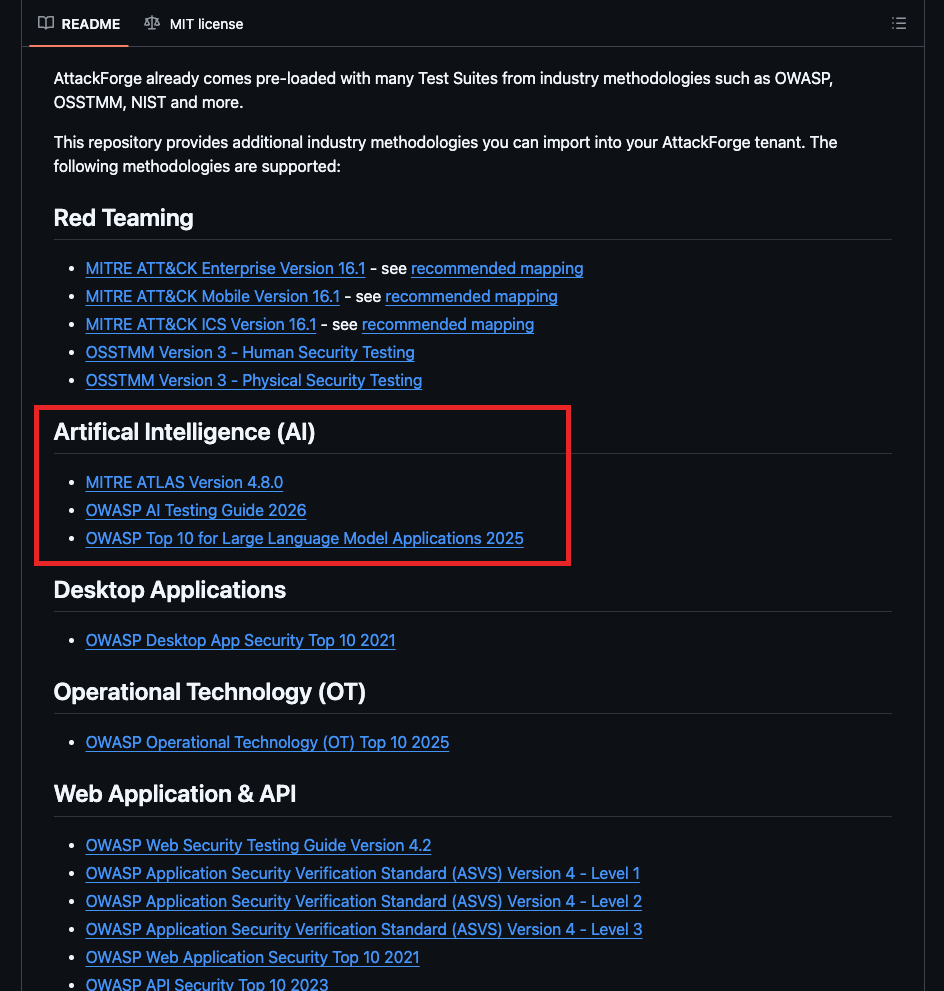
MITRE ATT\&CK v19.1 — the full set
The complete matrix trio, all on 19.1:
* 🏢 [ATT\&CK Enterprise 19.1](https://github.com/AttackForge/TestSuites/blob/main/MITRE/ATT%26CK/ENTERPRISE/mitre_attack_enterprise_19_1.json)
* 📱 [ATT\&CK Mobile 19.1](https://github.com/AttackForge/TestSuites/blob/main/MITRE/ATT%26CK/MOBILE/mitre_attack_mobile_19_1.json)
* 🏭 [ATT\&CK ICS 19.1](https://github.com/AttackForge/TestSuites/blob/main/MITRE/ATT%26CK/ICS/mitre_attack_ics_19_1.json)
Red team, purple team, adversary emulation, detection engineering, coverage reporting — all now running on current technique IDs and sub-techniques. 🧨
🤖 [MITRE ATLAS v2026.06](https://github.com/AttackForge/TestSuites/blob/main/MITRE/ATLAS/mitre_atlas_v2026.06.json)
Adversarial threat landscape for AI systems, freshly updated. If you're testing ML pipelines, model endpoints, or the agentic systems everyone is suddenly shipping to production — this is your methodology. Prompt injection, model evasion, data poisoning, supply chain attacks on AI. The demand for this one is going nowhere but up. 📈
🌐 [OWASP WSTG 4.2](https://localhost:3000/\(https://github.com/AttackForge/TestSuites/blob/main/OWASP/WSTG/owasp-wstg-4.2.json\))
The web app testing workhorse. Full methodology coverage, structured as test cases you can allocate, track and report against. 🕸️
✅ OWASP ASVS 5.0.0 — all three levels
* 1️⃣ [Level 1](https://github.com/AttackForge/TestSuites/blob/main/OWASP/ASVS/v5/owasp_asvs_5.0.0_level_1.json)
* 2️⃣ [Level 2](https://github.com/AttackForge/TestSuites/blob/main/OWASP/ASVS/v5/owasp_asvs_5.0.0_level_2.json)
* 3️⃣ [Level 3](https://github.com/AttackForge/TestSuites/blob/main/OWASP/ASVS/v5/owasp_asvs_5.0.0_level_3.json)
ASVS 5.0.0 is a significant rework from the 4.x line, and all three verification levels are packaged separately so you can scope an engagement to the assurance level the client is actually paying for. Sell L1, deliver L1, prove L1. 📐
📲 OWASP MASTG v2 (2026.01) — iOS & Android
* 🍎 [iOS](https://github.com/AttackForge/TestSuites/blob/main/OWASP/MASTG/v2/owasp-mastg-2.0.0-2026.01_ios.json)
* 🤖 [Android](https://github.com/AttackForge/TestSuites/blob/main/OWASP/MASTG/v2/owasp-mastg-2.0.0-2026.01_android.json)
Platform-split so your mobile testers get exactly the tests relevant to the build in front of them — no wading through the other platform's checks. 📱
#### Writeups Libraries
🐛 [MITRE CWE 4.20](https://github.com/AttackForge/Writeups/blob/main/MITRE/CWE/mitre_cwe_v4.20.json)
The full weakness enumeration as importable writeups. Consistent classification across every engagement, every tester, every report. 🏷️
⚔️ [MITRE CAPEC 3.9](https://github.com/AttackForge/Writeups/blob/main/MITRE/CAPEC/mitre_capec_v3.9.0.json)
Common attack patterns, ready to seed your vulnerability library with attack-centric context that maps cleanly alongside CWE. 🎯
### ReportGen Updates
We're always improving on our kick-ass reporting engine - ReportGen 🥋
You can now access [Custom Vulnerability Scoring](https://support.attackforge.com/attackforge-enterprise/getting-started/vulnerability-scoring-systems) details in the following places:
```
vulnerabilities[].custom_scoring
vulnerabilities[].affected_assets[].custom_scoring
```
### Self-Service API Updates
We're always improving our Self-Service APIs to make automations and integrations even easier! 💪
#### New REST APIs
* [**DeleteRemediationNoteFile**](https://support.attackforge.com/attackforge-enterprise/modules/self-service-restful-api/DeleteRemediationNoteFile)
* [**DeleteWorkspaceFile**](https://support.attackforge.com/attackforge-enterprise/modules/self-service-restful-api/DeleteWorkspaceFile)
* [**DeleteWorkspaceFile**](https://support.attackforge.com/attackforge-enterprise/modules/self-service-restful-api/DeleteWorkspaceFile)
* [**DeleteProjectTestCaseFile**](https://support.attackforge.com/attackforge-enterprise/modules/self-service-restful-api/DeleteProjectTestCaseFile)
* [**DeleteProjectTestCaseNoteFile**](https://support.attackforge.com/attackforge-enterprise/modules/self-service-restful-api/DeleteProjectTestCaseNoteFile)
* [**DeleteProjectTestCaseWorkspaceNoteFile**](https://support.attackforge.com/attackforge-enterprise/modules/self-service-restful-api/DeleteProjectTestCaseWorkspaceNoteFile)
* [**DeleteProjectNoteFile**](https://support.attackforge.com/attackforge-enterprise/modules/self-service-restful-api/DeleteProjectNoteFile)
* [**DeleteProjectReportingFile**](https://support.attackforge.com/attackforge-enterprise/modules/self-service-restful-api/DeleteProjectReportingFile)
* [**DeleteProjectSummaryPageFile**](https://support.attackforge.com/attackforge-enterprise/modules/self-service-restful-api/DeleteProjectSummaryPageFile)
* [**DeleteWorkspaceItemFile**](https://support.attackforge.com/attackforge-enterprise/modules/self-service-restful-api/DeleteWorkspaceItemFile)
* [**DeleteWorkspaceTestingLog**](https://support.attackforge.com/attackforge-enterprise/modules/self-service-restful-api/DeleteWorkspaceTestingLog)
* [**DeleteProjectRequestFile**](https://support.attackforge.com/attackforge-enterprise/modules/self-service-restful-api/DeleteProjectRequestFile)
* [**DeleteVulnerabilityLibraryFile**](https://support.attackforge.com/attackforge-enterprise/modules/self-service-restful-api/DeleteVulnerabilityLibraryFile)
* [**DeleteTestSuiteTestCaseFile**](https://support.attackforge.com/attackforge-enterprise/modules/self-service-restful-api/DeleteTestSuiteTestCaseFile)
* [**PatchRemediationNoteFile**](https://support.attackforge.com/attackforge-enterprise/modules/self-service-restful-api/PatchRemediationNoteFile)
* [**PatchVulnerabilityEvidence**](https://support.attackforge.com/attackforge-enterprise/modules/self-service-restful-api/PatchVulnerabilityEvidence)
* [**PatchWorkspaceFile**](https://support.attackforge.com/attackforge-enterprise/modules/self-service-restful-api/PatchWorkspaceFile)
* [**PatchProjectTestCaseFile**](https://support.attackforge.com/attackforge-enterprise/modules/self-service-restful-api/PatchProjectTestCaseFile)
* [**PatchProjectTestCaseNoteFile**](https://support.attackforge.com/attackforge-enterprise/modules/self-service-restful-api/PatchProjectTestCaseNoteFile)
* [**PatchProjectTestCaseWorkspaceNoteFile**](https://support.attackforge.com/attackforge-enterprise/modules/self-service-restful-api/PatchProjectTestCaseWorkspaceNoteFile)
* [**PatchProjectNoteFile**](https://support.attackforge.com/attackforge-enterprise/modules/self-service-restful-api/PatchProjectNoteFile)
* [**PatchProjectReportingFile**](https://support.attackforge.com/attackforge-enterprise/modules/self-service-restful-api/PatchProjectReportingFile)
* [**PatchProjectSummaryPageFile**](https://support.attackforge.com/attackforge-enterprise/modules/self-service-restful-api/PatchProjectSummaryPageFile)
* [**PatchWorkspaceItemFile**](https://support.attackforge.com/attackforge-enterprise/modules/self-service-restful-api/PatchWorkspaceItemFile)
* [**PatchWorkspaceTestingLog**](https://support.attackforge.com/attackforge-enterprise/modules/self-service-restful-api/PatchWorkspaceTestingLog)
* [**PatchProjectRequestFile**](https://support.attackforge.com/attackforge-enterprise/modules/self-service-restful-api/PatchProjectRequestFile)
* [**PatchVulnerabilityLibraryFile**](https://support.attackforge.com/attackforge-enterprise/modules/self-service-restful-api/PatchVulnerabilityLibraryFile)
* [**PatchTestSuiteTestCaseFile**](https://support.attackforge.com/attackforge-enterprise/modules/self-service-restful-api/PatchTestSuiteTestCaseFile)
#### Updates to REST APIs
* [**GetProjectsAndVulnerabilities**](https://support.attackforge.com/attackforge-enterprise/modules/self-service-restful-api/getprojectsandvulnerabilities) - now returns [Custom Vulnerability Scoring](https://support.attackforge.com/attackforge-enterprise/getting-started/vulnerability-scoring-systems) details
* [**GetProjectVulnerabilities**](https://support.attackforge.com/attackforge-enterprise/modules/self-service-restful-api/getprojectvulnerabilities) - now returns [Custom Vulnerability Scoring](https://support.attackforge.com/attackforge-enterprise/getting-started/vulnerability-scoring-systems) details
* [**GetVulnerability**](https://support.attackforge.com/attackforge-enterprise/modules/self-service-restful-api/getvulnerability) - now returns [Custom Vulnerability Scoring](https://support.attackforge.com/attackforge-enterprise/getting-started/vulnerability-scoring-systems) details
* [**GetVulnerabilities**](https://support.attackforge.com/attackforge-enterprise/modules/self-service-restful-api/getvulnerabilities) - now returns [Custom Vulnerability Scoring](https://support.attackforge.com/attackforge-enterprise/getting-started/vulnerability-scoring-systems) details
* [**GetVulnerabilitiesByAssetName**](https://support.attackforge.com/attackforge-enterprise/modules/self-service-restful-api/getvulnerabilitiesbyassetname) - now returns [Custom Vulnerability Scoring](https://support.attackforge.com/attackforge-enterprise/getting-started/vulnerability-scoring-systems) details
* [**GetVulnerabilitiesByGroup**](https://support.attackforge.com/attackforge-enterprise/modules/self-service-restful-api/getvulnerabilitiesbygroup) - now returns [Custom Vulnerability Scoring](https://support.attackforge.com/attackforge-enterprise/getting-started/vulnerability-scoring-systems) details
## 21 July 2026
### Review Notes, Reimagined
💬 A brand-new way to review, discuss, and resolve — right where the work happens.
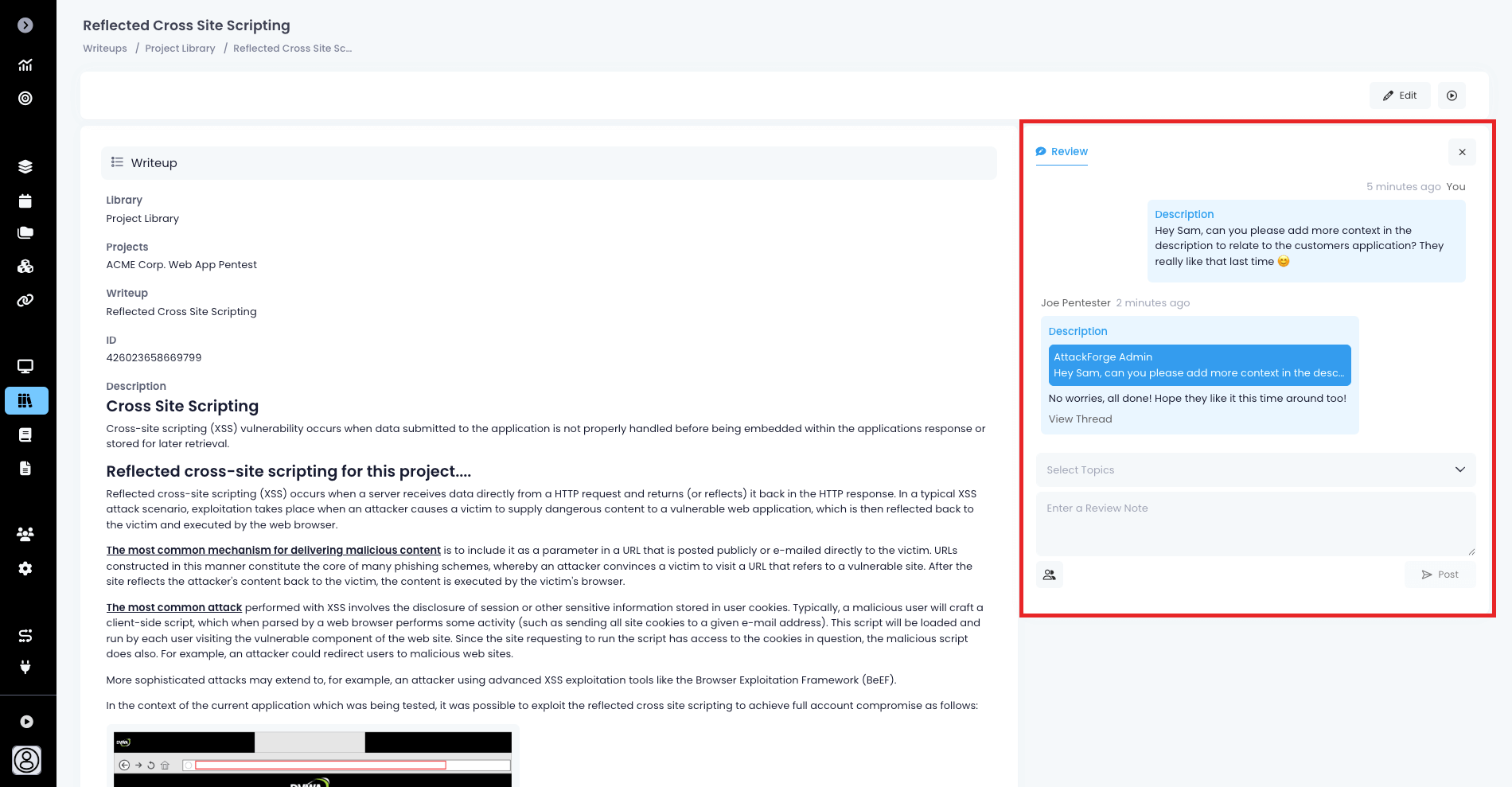
We've completely rebuilt the Review Notes experience from the ground up. It now lives alongside every field you're reviewing — with note counts attached to the fields they're about, threaded conversations, rich text editor, resolve tracking, and one-click deep links on email notifications that take you straight to the note that needs your attention.
#### What's New
📍 **Notes Live Next to Your Fields**
See unresolved review note counts posted right beside the fields they're about. Adding a note is just as easy: click the control next to any field and a note opens already scoped to it. Add note in context, and get straight back to work.
🧵 **Threaded Replies**
Replies now live in proper threads, presented as clean stacked screens you can drill into and step back out of.
✍️ **A Better Editor — Rich Text in a Bottom Sheet**
Composing a note now happens in a spacious rich-text editor that slides up in a bottom resizable sheet, giving you room to write properly.
✅ **Resolve & Track — Know What's Still Open at a Glance**
Mark notes as resolved (with a timestamp and a clear resolved badge), and filter your view by Open, Resolved, or All. Topic badges surface unresolved counts so reviewers can zero in on what still needs attention — and resolved threads stay tidily out of the way until you want them.
🔎 **Smart Filtering — See Only What Matters**
Filter notes by topic and by status, with a banner that always shows the summary.
🔗 **Deep Links — Zero Hunting**
Click on the email notification link and land directly on the exact note (even deep inside a reply thread), highlighted and ready to action.
Happy reviewing! 🎉
### User Interface Updated
✨ **A Fresh New Look**
We've given the interface a serious glow-up! 🎨
You'll notice a sleeker, more modern feel the moment you log in - refined visuals, refreshed touches, and a contemporary polish that makes every table, menu, icon, form and click - feel that little bit smoother.
Changes are rolling out across the entire application, so keep an eye out as you navigate around. It's the same platform you know and love - just wearing something a bit more stylish. 💫
We hope you love it as much as we loved building it! 🚀
### Groups Just Got Powered-Up
Managing your teams in AttackForge is now faster and easier. 💪
🔐 **Per-Member Permission Control**
Say goodbye to one-size-fits-all group settings! You can now dial in `Flow Sharing` and `Action Sharing` permissions on a per-group-member basis. Give your senior testers full reign, keep your interns on training wheels, or craft any custom access mix in between — the choice is yours. 🎯
⚡ **Bulk Actions Have Landed**
Managing team members one-by-one? That's so last release. With shiny new bulk actions, you can update permissions across your groups in a fraction of the clicks. Less admin, more adversary emulation. 🕵️
🚀 **The Bottom Line**
Less time managing teams. More time hacking. That's what we call a win. Get in there and start bulk-configuring your way to team management nirvana. 🔥
### Bulk-Add SSO Mappings
Enterprise admins, this one's for you. We've just obliterated one of the most tedious jobs in identity management. 🎯
🚀 **Map at Warp Speed**
Configure and map hundreds — or even thousands — of Identity Provider groups in a single sweep. Whether you're onboarding a massive org, restructuring your IdP, or finally getting around to that SSO overhaul you've been dreading, bulk-add has your back. 💥
😮💨 **Kiss Mapping Mayhem Goodbye**
No more click-fatigue. No more losing your afternoon (or your sanity) to endless one-by-one entries. What used to take hours now takes minutes — freeing you up for the work that actually matters. 🔥
🎯 **Built for Scale**
Whether you're rolling with Entra ID, Okta, Ping, or any other IdP flavor, AttackForge's SSO mappings now scale as big as your enterprise demands. Growth-ready, admin-friendly, coffee-break-approved. ☕
### Self-Service API Updates
We're always improving our Self-Service APIs to make automations and integrations even easier! 💪
#### New REST APIs
* [**PatchGroupMember**](https://support.attackforge.com/attackforge-enterprise/modules/self-service-restful-api/patchgroupmember) - Patch a group member's access on a group.
## 25 June 2026
### Introducing System Actions, Actions Catalogue and Sharing Actions
⚡ **Actions Just Got a Massive Upgrade: User Actions, System Actions & Sharing!**
Get ready to supercharge your workflows! We've rolled out a powerful new way to create, manage, and share Actions across your organization — giving you more flexibility and control than ever before.
#### What's New
👤 **User Actions — Make It Personal**
Every user can now create, update, delete, and share their very own User Actions. Build the workflows that work for you, and bring your teammates along for the ride. Perfect for personal automations, team collaborations, and everything in between.
🏢 **System Actions — Roll It Out at Scale**
Administrators, this one's for you. System Actions let you configure powerful workflows and roll them out to your users — no acceptance or assignment required on their end. Deploy organisation-wide automations effortlessly, and rest easy knowing all admins automatically inherit Action Owner privileges on every System Action.
Need to pivot? Admins can switch any Action between System and User Action at any time. 🔄
🤝 **Sharing Actions — Collaboration Unlocked**
Sharing is now smarter and more flexible:
Admins can share System Actions and their User Actions with Roles, Groups, or individual Users. Non-admins can share their User Actions with their own Groups and other Users.
Fine-tune access with three levels — None (a powerful denylist option), View (trigger the Action), and Edit (trigger and configure). Plus, the Override option guarantees your assigned access prevails, so users won't accidentally inherit access they shouldn't have through their Roles or Groups.
🔍 **Effective Access — Crystal Clear Visibility**
Want to know exactly who can access your Action? Effective Access gives Action Owners the definitive answer, factoring in every Role, Group, and User assignment. Available right from the Action settings page — just click Effective Access and see the full picture.
More power. More flexibility. More collaboration. Go build something amazing! 🚀
### Custom Vulnerability Scoring Systems
🚀 **Score Vulnerabilities Your Way — Multi-Framework Scoring Is Now Available!**
Stop forcing every vulnerability through a single lens. AttackForge now ships with first-class support for every major vulnerability scoring framework — and lets you mix, match, and build your own on top.
✨ **What's Included Out-of-the-Box**
Spin up a fresh deployment and you'll find five battle-tested scoring systems already loaded:
* **CVSS 3.1** — the industry workhorse for technical severity
* **CVSS 4.0** — the latest evolution of the standard
* [**DREAD Threat Modelling**](https://support.attackforge.com/attackforge-enterprise/getting-started/vulnerability-scoring-systems#dread-threat-model) — Microsoft's classic threat model for fast triage
* [**OWASP Risk Rating Methodology**](https://support.attackforge.com/attackforge-enterprise/getting-started/vulnerability-scoring-systems#owasp-risk-rating-methodology) — likelihood × impact with business context baked in
* [**Custom 4x4 Risk Matrix**](https://support.attackforge.com/attackforge-enterprise/getting-started/vulnerability-scoring-systems#custom-4x4-risk-scoring) — board-friendly probability vs. impact scoring
Already have an existing AttackForge deployment? No problems! Click on any of the links above to access the scoring system configuration and add it to your own AttackForge instance!
🎯 **Run Multiple Frameworks on the Same Vulnerability**
Here's the big idea: you don't have to pick just one. Stack as many scoring systems as you want on a single project and watch them work together.
You can now benefit from:
* **Complementary perspectives** — CVSS handles technical exploitability, DREAD adds discoverability and user reach, OWASP layers in business impact. Together, full picture.
* **Smarter prioritization** — a CVSS-critical bug that's hard to find and affects a non-revenue system? Multiple frameworks help you avoid both over-reacting and under-reacting.
* **Speak every dialect** — CVSS for compliance auditors, OWASP for executives, DREAD for the engineering huddle. One vulnerability, every audience.
* **Cancel out bias** — if all three frameworks scream "critical," confidence goes up.
🛠️ **Build Your Own Scoring System**
Need something custom? Head to `Administration → Vulnerabilities → Scoring` and click `Add Custom Scoring System`. You get:
* **Custom forms** — design your own sections and fields that appear when scoring.
* **A priority script engine** — write AFScript logic that returns Critical / High / Medium / Low / Info.
* **Cross-context awareness** — your script can pull data from other scoring systems, vulnerability fields, writeups, affected assets, and project metadata.
🔐 **Project-Level Control**
When you assign scoring systems to a project, you've got the steering wheel:
* **Required flag** — force testers to score using specific systems.
* **Ordered priority** — the top-ranked system wins when scores conflict.
* **Per-system access levels** — hide custom scoring rationale from lower-privilege roles when needed.
💡 **Smart Conflict Detection**
When a manually overridden priority disagrees with what the scoring systems calculated, AttackForge flags the mismatch — so you always know when human judgment has diverged from the math.
📜 **Ready-Made Priority Scripts**
The documentation ships with working AFScript examples for DREAD (1–50 score bands), OWASP (likelihood × impact matrix), and the Custom 4x4 — copy, paste, tweak, ship.
The bottom line: one vulnerability, many lenses, zero compromise. Pick your framework — or invent a new one — and get to triaging. 🎉
### Automated AI Attack Chains
🤖 **Build and Explore Attack Chains automatically for every project!**
💥 Attack Chains turn a list of findings into a real story with impact. This shift unlocks many benefits which a usual vulnerability list cannot show:
* **Demonstrate real impact**. A report full of "medium" issues — a misconfigured share here, a weak service account there, an outdated Confluence page — tends to get triaged into oblivion. Chain them together into "anonymous foothold → credential harvest → lateral movement → domain admin → crown jewels," and suddenly the same findings represent an existential business risk. The attack chain proves the *so what?*, which is usually what executives and risk owners actually care about.
* **Forces realism**. Individual vulns are scored in isolation using CVSS or other, but attackers don't operate that way. Demonstrating the attack chain proves the path is actually walkable in the target environment, not just theoretically exploitable. Findings that looked scary on paper sometimes don't chain to anything meaningful, and findings that looked boring sometimes turn out to be the linchpin. That's much better signal for prioritization than severity scores alone.
* **Remediate faster with *****break-chain***** thinking rather than *****fix-everything***. If five distinct findings are required to reach impact, the defender doesn't necessarily need to fix all five — breaking any one link disrupts the path. That's often significantly cheaper and faster than full remediation, and it gives the client a defensible interim posture while longer-term fixes land.
* **Map cleanly onto frameworks like MITRE ATT\&CK and Cyber Kill Chain**. Give the blue team a shared vocabulary. Each stage becomes a detection opportunity: if recon was caught, the chain stops at stage one; if not, where else could it have been broken? This feeds directly into purple-team exercises, SOC tuning, and tabletop scenarios.
* **Expose systemic weaknesses that single findings hide**. Over-permissioned service accounts, flat networks, missing egress controls, identity sprawl. Those root causes rarely show up as a single CVE but fall out clearly when you look at how an attacker actually moved from end-to-end.
In this release, we've included four (4) Attack Chain variants to help you:
#### [Interactive Attack Chain Explorer](https://support.attackforge.com/attackforge-enterprise/modules/ai-mcp-and-skills#interactive-attack-chain-explorer)
The Attack Chain Explorer generates an interactive web page from real AttackForge testing data — turning a project's findings into an animated, explorable kill-chain report. Pick from various distinct attack chains — different routes an attacker could realistically take through the engagement. Watch each chain animate stage-by-stage: attacker → recon → actionable stages → outcome. Hit `Best fix` to see the single highest-leverage remediation, or `Break chain` to see where any one fix collapses the path.
#### MITRE ATT\&CK
The MITRE ATT\&CK option will frame the project's findings against MITRE's tactics — Reconnaissance, Initial Access, Execution, Persistence, etc. It's built to land the attack chain narrative, the remediation plan, and the priority call - all on one page, so it suits board / leadership / engineering briefings.
There are two styles to choose from, and they produce visually and structurally different chains:
[**Style 1 — Executive landscape, one-pager**](https://support.attackforge.com/attackforge-enterprise/modules/ai-mcp-and-skills#mitre-att-and-ck-attack-chain-style-1)
[**Style 2 — Portrait narrative, debrief leave-behind**](https://support.attackforge.com/attackforge-enterprise/modules/ai-mcp-and-skills#mitre-att-and-ck-attack-chain-style-2)
#### [Cyber Kill Chain](https://support.attackforge.com/attackforge-enterprise/modules/ai-mcp-and-skills#cyber-kill-chain)
The Cyber Kill Chain option maps every finding in an AttackForge project onto the seven stages of the Lockheed Martin Cyber Kill Chain — but with modernized offensive-security labels: Reconnaissance, Payload Development, Initial Access, Exploitation, Persistence, Command & Control, Mission Impact.
Try generating these Attack Chains on your next project! Your customers and internal teams are sure to be impressed 🤩
### New Tenable and Qualys Workflow Automations
🔄 **Click a button. Get a full Tenable or Qualys scan. Findings auto-import back into AttackForge.**
We've built new workflow automations giving you turnkey orchestration between AttackForge and Tenable and Qualys Web App Scanning (WAS) and Vulnerability Management (VM).
🎯 **One Action Button, Full Scan Lifecycle**
A tester (or automation) clicks an Action on a Project in AttackForge → the project scope flies into Tenable → scans launch → status gets polled frequently → completed results flow straight back into AttackForge as vulnerabilities. No manual hand-offs, no babysitting.
💡 **Why This Matters**
* **Zero context switching** — testers never leave AttackForge to kick off a Tenable scan.
* **Self-healing orchestration** — retries, aborts, multi-target fan-out, and email alerts are all built in.
* **Bulk friendly** — fire off scans across many projects in one Action click.
* **Stateful tracking** — every scan lives on the project as a custom field, so the cron job always knows what to poll.
* **Hands-off ingestion** — findings appear in AttackForge automatically when Tenable or Qualys finishes.
These new workflow automations will help you with *Continuous Threat Exposure Management (CTEM)* and ensuring that your vulnerability scans are *easy to trigger, consistent, and automatically ingested, contextualized and prioritized!* 😎
Whether you're using **Vulnerability Management (VM)** or **Web Application Scanning (WAS)** - we've got you covered:
* [Tenable VM Workflow](https://support.attackforge.com/attackforge-enterprise/modules/flows/tenable)
* [Tenable WAS Workflow](https://support.attackforge.com/attackforge-enterprise/modules/flows/tenable)
* [Qualys VM Workflow](https://support.attackforge.com/attackforge-enterprise/modules/flows/qualys)
* [Qualys WAS Workflow](https://support.attackforge.com/attackforge-enterprise/modules/flows/qualys)
These new workflows will help you to:
* *Trigger immediate scans* directly from your projects.
* *Track the status* of each scan against the project.
* *Automatically ingest findings* as scans complete, with error reporting when there's issues.
* *Prioritize findings using your own rules* - focus on the vulnerabilities that matter!
Bottom line: AttackForge project scopes go in, Tenable and Qualys findings come out — and the whole loop runs itself on your frequency. Import the example Flows, set your secrets, and ship. 🎉
### WIZ Integration
Pentest findings, meet cloud security platform! 🥳
We've released new Flows to help you start streaming vulnerabilities straight into Wiz — automatically.
⚡ **Two Triggers, Same Destination** Pick your event, control what information goes into WIZ:
* [**Vuln Created Flow**](https://support.attackforge.com/attackforge-enterprise/modules/flows/wiz#export-vulnerability-to-wiz-on-vuln-created) — the instant a tester logs a finding, it's on its way to Wiz
* [**Vuln Updated Flow**](https://support.attackforge.com/attackforge-enterprise/modules/flows/wiz#export-vulnerability-to-wiz-on-vuln-updated) — catches vulnerabilities that weren't ready at creation but mature into export candidates later
🎯 **What Gets Exported**
Each AttackForge vulnerability lands in Wiz as a fully-formed attack surface finding, complete with:
* **Severity mapping** — AttackForge Critical/High/Medium/Low/Info translates cleanly to Wiz Critical/High/Medium/Low/None.
* **Affected asset endpoint** — hostname, port, and protocol pulled straight from asset custom fields.
* **Rich context** — description + attack scenario, steps to reproduce, vulnerability notes, and remediation guidance, all bundled into the assessment details.
* **Deep link back to AttackForge** — one click from the Wiz finding takes the analyst to the source vuln
* **Stable datasource ID** — keyed per project so findings group sensibly inside Wiz.
🧰 **Customization-Friendly**
Need to send more or less data? No problem! Adjust the Flows easily inside AttackForge to match your needs. Swap the vulnerability type (DAST, SAST, SCA, IaC, ContainerScan, HostScan, SecretDetection, Misconfiguration), tweak the severity mapping, or fan out to multiple payloads per vuln. Your tenant, your rules.
🛡️ **Pre-Flight Validation Built In**
The Flow doesn't fire blindly. Before anything touches the Wiz API, it performs validation first. Extend the validation to match your own unique integration requirements!
Bottom line: plug it in, set your secrets, and every qualifying finding in AttackForge shows up in Wiz with the full pentest context attached — no CSVs, no copy-paste, no missed handoffs. 🎉
### UX Improvements
We're constantly fine-tuning the user experience so every minute spent in AttackForge feels effortless 😎
#### New Design: Page View
We've given some of our most-used pages a fresh new look (and feel). Vulnerabilities, Writeups, Test Cases, Project Summaries, Reporting, and Project Requests now feature a redesigned layout, smarter navigation, and a cleaner, more focused experience.
**What's new:**
🧭 **Table of contents with built-in search and jump-to-section** — find what you need in seconds
↔️ **Adjustable panes** — expand your reading space whenever you need room to think
📂 **Collapsible sections** — show what matters, hide what doesn't
📎 **Faster access to files and history** — fewer clicks, more flow
#### Configure Default Tab on Module Load
🎯 **Land where you work most**
You can now choose which tab loads by default when you open a module. Spend most of your time in a specific view? Set it as your landing spot and skip the extra click every time.
Small change, big time-saver.
#### Project Code - Disable or Optional
🛠️ **More control over your Project form**
The Project Code field is no longer one-size-fits-all. You can now make it optional — or remove it entirely — to match the way your team actually works.
Head to `Administration > Projects > Details Form` to tailor it your way.
#### Groups Contact Fields - Disable or Optional
👥 **Streamline your Group setup**
The Group Contact fields just got more flexible. Make them optional — or remove them entirely — so your Group records capture exactly what you need, and nothing you don't.
Head to `Administration > Groups > Details Form` to personalize your groups.
#### Copy Page Title or ID
📋 **One click, copied**
Need to grab a page title or system ID? Just click the page title and choose what you'd like to copy. No more highlighting, no more fiddly selections — it's right there when you need it.
#### System Dropdowns Now Support Search
⚡ **Searchable dropdowns**
Dropdown lists now support search across all configured options — find what you need instantly, even in the longest lists.
#### Enforce Remediation Note on Retest
🔒 **Mandatory remediation notes for retests**
Optionally require a remediation note when vulnerabilities are marked as ready for retest — ensuring retesters have the context needed to validate fixes effectively.
Head over to `Administration > Vulnerabilities > Status > Status Update` to make the change.
#### Make Attack Scenario Mandatory
🛡️ **Mandatory Attack Scenario field**
Optionally require the Attack Scenario field on new Writeups — ensuring testers capture attack-specific context whenever a new issue type is defined.
Head over to `Administration > Writeups > Form` to make the change.
#### Improved User Lockout Experience for On-Premise Deployments
⚙️ **Configurable lockout policies**
You can now fine-tune the `max failed login attempts` and `account lockout timeout` policies to match your security requirements. Tighten things up, ease them off — your policy, your call.
#### All Project Request System Fields Now Accessible in Table
👀 We've loaded all the Project Request core/system fields and made them available in the `Pending Requests` and `Actioned Requests` tables!
You can now sort, filter, toggle and group all system and custom fields - and include them in your Custom Views!
### Additional Group Access - APIs, Events, Flows, Actions, AI MCP Tools
Your Groups just levelled up. Power your automations, your integrations, and your AI - using Group-driven access control.
🎯 What's New
Say hello to `Other Access` — a brand-new tab on every Group page that lets administrators extend Group membership to a whole new set of capabilities. No more juggling individual user permissions. No more "wait, how do we get that team access to that?" Just one Group, one place, one click.
🔓 What Groups Can Now Access
* **Events via Flows** — Pipe internal events to the right team automatically
* **Events via Self-Service API** — Programmatic event access, gated by Group
* **Self-Service RESTful APIs** — Empower teams to build on AttackForge data
* **Flows** — Unlock ability for teams to build workflow automations and integrations
* **Actions** — Liberate teams to create Actions which matter to them
* **AI MCP** — Yes, even AI access is Group-managed now 🤖
💪 Why You'll Love It
🎛️ **Granular by design** — Administrators assign access per-Group, on a needs basis. Right people, right tools, right level.
⚡ **Scales with your org** — Onboard a new customer team, vendor, or internal squad and they instantly inherit access to the APIs, Flows, Actions, and AI surfaces you've already approved for their Group.
🧠 **One source of truth** — Group membership now drives access across projects, portfolios, vulnerabilities, AND your automation stack. Less drift, fewer gaps, way less audit headache.
🔐 **Enterprise-grade control** — Everything lives behind the Other Access panel on the Group page, so admins always know exactly who can do what.
🏁 How to Use It
1. Head to any Group in AttackForge
2. Click `Other Access`
3. Toggle on Events, APIs, Flows, Actions, or AI MCP — whatever this Group needs
4. Done. ✅ Members inherit the access automatically.
Bottom line: Groups are now the control plane for everything — not just data, but the Flows, Actions, APIs, and AI that make AttackForge sing. 🎶
### Flows Updates
We've made our Workflow Automation Engine [Flows](https://support.attackforge.com/attackforge-enterprise/modules/flows) even better! 🤖
#### Sharing Roles and Groups Access to Flows
🚀 **Collaborate Like Never Before: Share Flows with Roles & Groups!**
You can now share your Flows with Roles, Groups, and individual Users — making collaboration smoother and access management a breeze.
🔐 **Smarter Sharing for Everyone**
* Administrators can now share Flows directly with Roles, Groups, or individual Users — perfect for rolling out access across your organization.
* Non-admins can now share their Flows with their own Groups and other Users, empowering teams to work together without waiting on admin approval.
👀 **Introducing Effective Access**
Ever wondered exactly who can access a Flow? Wonder no more. Effective Access gives Flow Owners a single source of truth, showing precisely which users have access based on every Role, Group, and User assignment in play.
Just head to your Flow settings page and click Effective Access to see the complete picture.
Less guesswork, more teamwork. Happy Flowing! ✨
#### New Trigger Events
* [**asset-created**](https://support.attackforge.com/attackforge-enterprise/modules/self-service-events-api/asset-created) - Handle event when an Asset in the Asset Module is created.
* [**asset-updated**](https://support.attackforge.com/attackforge-enterprise/modules/self-service-events-api/asset-updated) - Handle event when an Asset in the Asset Module is updated.
* [**asset-archived**](https://support.attackforge.com/attackforge-enterprise/modules/self-service-events-api/asset-archived) - Handle event when an Asset in the Asset Module is archived.
* [**asset-restored**](https://support.attackforge.com/attackforge-enterprise/modules/self-service-events-api/asset-restored) - Handle event when an Asset in the Asset Module is restored.
* [**user-created**](https://support.attackforge.com/attackforge-enterprise/modules/self-service-events-api/user-created) - Handle event when a User is created.
* [**user-updated**](https://support.attackforge.com/attackforge-enterprise/modules/self-service-events-api/user-updated) - Handle event when a User is updated.
* [**project-request-file-uploaded**](https://support.attackforge.com/attackforge-enterprise/modules/self-service-events-api/project-request-file-uploaded) - Handle event when a file on a Project Request is uploaded.
* [**project-on-hold**](https://support.attackforge.com/attackforge-enterprise/modules/self-service-events-api/project-on-hold) - Handle event when a Project is on-hold.
* [**project-off-hold**](https://support.attackforge.com/attackforge-enterprise/modules/self-service-events-api/project-off-hold) - Handle event when a Project is off-hold.
* [**vulnerability-remediation-plan-created**](https://support.attackforge.com/attackforge-enterprise/modules/self-service-events-api/vulnerability-remediation-plan-created) - Handle event when a Remediation Plan is created on a Vulnerability.
* [**vulnerability-remediation-plan-updated**](https://support.attackforge.com/attackforge-enterprise/modules/self-service-events-api/vulnerability-remediation-plan-updated) - Handle event when a Remediation Plan is updated on a Vulnerability.
* [**workspace-testing-log-uploaded**](https://support.attackforge.com/attackforge-enterprise/modules/self-service-events-api/workspace-testing-log-uploaded) - Handle event when a testing log file is uploaded to the Project Workspace.
* [**project-member-added**](https://support.attackforge.com/attackforge-enterprise/modules/self-service-events-api/project-member-added) - Handle event when a user is added to the Project Team for a Project.
* [**project-member-updated**](https://support.attackforge.com/attackforge-enterprise/modules/self-service-events-api/project-member-updated) - Handle event when a user is updated on the Project Team for a Project.
* [**project-member-removed**](https://support.attackforge.com/attackforge-enterprise/modules/self-service-events-api/project-member-removed) - Handle event when a user is removed from the Project Team for a Project.
#### Duplicate Actions
⚡ **Build Flows faster**
You can now duplicate actions in your Flows. Bootstrap new actions from existing ones, make a few tweaks, and you're off — no more rebuilding from scratch every time. A massive time-saver when you're building out complex automations.
#### HTML Response on HTTP Triggered Flows
📧 **One click. Clear feedback.**
Triggering automations from an email button click just got a whole lot friendlier. Add `?format=html` to the end of your [Trigger URL](https://support.attackforge.com/attackforge-enterprise/modules/flows#http-trigger-url) on any [HTTP Triggered Flow](https://support.attackforge.com/attackforge-enterprise/modules/flows#external-events), and users will land on a confirmation page acknowledging their request — including any helpful error details if something didn't go to plan.
No more guessing whether the click actually did anything.
#### Secrets Now Support Multi-Lines
🔑 **Multi-line Secrets**
Secrets now support multi-line input — ideal for PEM keys and anything else that needs those line breaks preserved exactly as written. Paste with confidence.
### AFScript Updates
We've powered-up 🔋 our in-app scripting language [AFScript](https://support.attackforge.com/attackforge-enterprise/afscript) to make writing scripts even easier!
#### New Functions
* [**String.from()**](https://support.attackforge.com/attackforge-enterprise/afscript#strings) - Use this function to return a string representing the primitive or object.
* [**String.sign()**](https://support.attackforge.com/attackforge-enterprise/afscript#strings) - Use this function to cryptographically sign a message using a private key for signing.
* [**String.verify()**](https://support.attackforge.com/attackforge-enterprise/afscript#strings) - Use this function to verify a cryptographically signed message with a public key.
* [**XML.parse()**](https://support.attackforge.com/attackforge-enterprise/afscript#xml) - Use this function to parse an XML string, constructing the JSON value or object described by the string.
#### Updated Functions
* [**Date.format()**](https://support.attackforge.com/attackforge-enterprise/afscript#dates) - This function was updated to now support passing a `timezone` parameter to include a timezone offset.
### ReportGen Updates
We're always improving on our kick-ass reporting engine - **ReportGen** 🥋
#### New Filters
* [**Substring**](https://support.attackforge.com/attackforge-enterprise/modules/reporting/template-filters#substring) - You can return a substring from a string.
### Self-Service API Updates
We're always improving our Self-Service APIs to make automations and integrations even easier! 💪
#### New REST APIs
* [**ParseCSVData**](https://support.attackforge.com/attackforge-enterprise/modules/self-service-restful-api/parsecsvdata) - Parse CSV data to JSON format.
* [**GetUserProfile**](https://support.attackforge.com/attackforge-enterprise/modules/self-service-restful-api/getuserprofile) - Get Profile for a User.
* [**UpdateUserProfile**](https://support.attackforge.com/attackforge-enterprise/modules/self-service-restful-api/updateuserprofile) - Update Profile for a User.
* [**RequestInformationOnProjectRequest**](https://support.attackforge.com/attackforge-enterprise/modules/self-service-restful-api/requestinformationonprojectrequest) - Request Information on a Project Request.
* [**DownloadProjectRequestFile**](https://support.attackforge.com/attackforge-enterprise/modules/self-service-restful-api/downloadprojectrequestfile) - Download a file on a Project Request.
* [**UploadProjectRequestFile**](https://support.attackforge.com/attackforge-enterprise/modules/self-service-restful-api/uploadprojectrequestfile) - Upload a file to a Project Request.
* [**RichTextToConfluenceWiki**](https://support.attackforge.com/attackforge-enterprise/modules/self-service-restful-api/richtexttoconfluencewiki) - Convert data from rich-text to Confluence Wiki markup.
* [**UploadWorkspaceTestingLog**](https://support.attackforge.com/attackforge-enterprise/modules/self-service-restful-api/uploadworkspacetestinglog) - Upload a testing log to a Project Workspace.
* [**GetReportTemplates**](https://support.attackforge.com/attackforge-enterprise/modules/self-service-restful-api/getreporttemplates) - Get all Report Templates user has access to.
* [**DownloadReportTemplate**](https://support.attackforge.com/attackforge-enterprise/modules/self-service-restful-api/downloadreporttemplate) - Download a Report Template user has access to.
#### Updates to REST APIs
* [**GetProjects**](https://support.attackforge.com/attackforge-enterprise/modules/self-service-restful-api/getprojects) - now supports `?order=created:asc` and `?order=created:desc` to determine sort order on created timestamp.
* [**GetProjectRequests**](https://support.attackforge.com/attackforge-enterprise/modules/self-service-restful-api/getprojectrequest) - now supports the [Advanced Query Filter](https://support.attackforge.com/attackforge-enterprise/modules/self-service-restful-api/advanced-query-filter).
## 5 March 2026
### Build Your Own Custom Workflows - In The UI!
The team at AttackForge are incredibly excited to bring you.. **Actions**! 🤩🤩
[Actions](https://support.attackforge.com/attackforge-enterprise/actions) enable you to *build your own custom workflows* into the AttackForge application user interface, and trigger those workflows with a *simple button click*.
With the newest addition of Actions, this completes our mission to empower our customers with ***Automation - Anytime, Anywhere, by Anyone!***
You can now create Workflow Automations in AttackForge from:
* **Internal Events** - e.g. when a vulnerability is created or updated
* **External Events** - e.g. when changes happen in other systems or scripts
* **Scheduled Events** - e.g. run automations hourly, daily, weekly, or a custom frequency
* ***NEW*** **Actions** - e.g. when a user clicks on an Action within the app
And best of all - these Workflow Automations are *built directly into AttackForge*! Meaning:
* No need for complex middleware, or scripts running on *someones* machine
* Full visibility and control into what your automations are doing at every step
* No additional assets or infrastructure to procure and manage
* Auditability and access controls across all automations, including secrets management!
You can create Actions to *help you*:
* **Build custom workflows for your teams**
* **Trigger a process automation**
* **Launch an integration with an external system**
Examples of Actions could include:
* *Request a QA review / Approve a QA review*
* *Launch scans within your security tooling*
* *Create bulk actions which do not currently exist*
* *Trigger a custom vulnerability risk acceptance workflow*
* *Enable low-privileged users to perform isolated privileged tasks*
* *Export data on-demand*
* *Run custom reports and email the results*
* *Anything you can imagine* 😄
Actions can be created and accessed within any of the following entities:
1. [Project Request(s)](https://support.attackforge.com/attackforge-enterprise/getting-started/requesting-a-project)
2. [Project(s)](https://support.attackforge.com/attackforge-enterprise/getting-started/creating-and-managing-projects)
3. [Project Vulnerability(s)](https://support.attackforge.com/attackforge-enterprise/getting-started/creating-vulnerabilities)
4. [Project Test Case(s)](https://support.attackforge.com/attackforge-enterprise/getting-started/test-cases)
5. [Portfolio(s)](https://support.attackforge.com/attackforge-enterprise/modules/portfolios)
6. [Portfolio Stream](https://support.attackforge.com/attackforge-enterprise/modules/portfolios)
7. [Group(s)](https://support.attackforge.com/attackforge-enterprise/modules/groups)
8. [Asset(s)](https://support.attackforge.com/attackforge-enterprise/modules/assets)
9. [Writeup(s)](https://support.attackforge.com/attackforge-enterprise/modules/vulnerability-library)
10. [User(s)](https://support.attackforge.com/attackforge-enterprise/modules/users)
11. [Application](https://support.attackforge.com/attackforge-enterprise/actions#application-actions)
When triggering an Action, a confirmation dialogue will appear. You can also access more information in the `README`
After you click on `Run` - the Action will be triggered and it will show in your `Action Runs Manager`.
From here, you can monitor the status of your triggered Action.
You can click on the status to see more information:
You can also build `Application Actions`. These Actions relate to the application itself, they are not tied to any particular entity such as a Project, Vulnerability or Asset.
You can use Application Actions *at any time* - regardless of what access you have to other data and workflows in AttackForge.
This makes them ideal for ***personal workflows***, or ***delegating privileged workflows*** to lower-privileged users.
Actions are powered by [Flows](https://support.attackforge.com/attackforge-enterprise/modules/flows). Flows is AttackForge's **powerful Workflow Automation engine**, allowing users to *create completely custom workflows, automations and integrations*.
Flows is powered by [AFScript](https://support.attackforge.com/attackforge-enterprise/afscript) - AttackForge's **easy-to-use scripting language**, creating *infinite possibilities* with your Actions and Flows!
Actions can be linked to multiple Flows - meaning many workflows can be triggered from one single Action.
> Coming Soon! You can share your Actions, and also create Custom Forms on Actions!
### Project Scope Assets Improvements
We've significantly improved on how you can interact with assets on a project! 🥳
We've improved the project scope assets interface to make it easier to work with data.
You can now add scope and import assets directly when creating or editing vulnerabilities - without leaving the page, reducing friction when working on vulnerabilities:
Importing assets now support list imports where you can copy/paste a delimited list of assets to import:
You can now view full asset information (including components) directly from the vulnerabilities table.
We've added advanced filtering on all asset related tables within a project.
You can also manage project scope assets anywhere within a project where scope assets can be selected.
We've also extended the *Quick Select* and *Table* options to all places for filtering and selecting assets.
### Review Notes In More Places
In recent updates, we've focused on making quality assurance reviews ✅ *faster and easier* in AttackForge.
In this update, we've extended [Review Notes](https://support.attackforge.com/attackforge-enterprise/getting-started/reviewing-and-qa-vulnerabilities) to **Writeups** and **Test Cases on Test Suites**:
### Table Custom Field Improvements
We've powered up Table Custom Fields! 💪
You can now use *Rich-Text fields in Table Custom Fields*.
This is ideal when you need a list of Rich-Text context, such as **Narratives, Timelines, Notes, and more**.
We've also added support for ***List*** fields in Table Custom Fields too!
You can also control which fields need to be displayed when viewing the table.
We've also improved Table Custom Field features to support filtering for all columns, as well as `Export to CSV`.
We've also improved the user experience when viewing and editing rows of data within the table.
### Improvements In Analytics
We've enhanced all of the `Top 10 Analytics` to now include more details!
### New AI Testing Methodologies
If you're currently or planning to do `AI pentesting` - look no further! 👀
We've added two more AI pentesting methodologies, in addition to the existing [**MITRE ATLAS Framework**](https://github.com/AttackForge/TestSuites/blob/main/MITRE/ATLAS/mitre_atlas_4.8.0_testcases.json):
* [**OWASP AI Testing Guide**](https://github.com/AttackForge/TestSuites/blob/main/OWASP/AITG/owasp_ai_testing_guide_2026.json) - The OWASP AI Testing Guide (AITG) is an open-source, community-driven framework providing standardized methodologies to test the trustworthiness, security, and reliability of AI and LLM systems. It offers comprehensive, actionable test cases across four key layers—Application, Model, Data, and Infrastructure—to help developers and auditors manage AI-specific risks like prompt injection and bias.
* [**OWASP LLM Top 10**](https://github.com/AttackForge/TestSuites/blob/main/OWASP/Top%2010/OWASP-LLM-Applications-Top-10-2025.json) - The OWASP Top 10 for Large Language Model (LLM) Applications is a comprehensive framework identifying the most critical security risks when integrating LLMs into applications. It focuses on unique vulnerabilities like prompt injection, insecure output handling, and training data poisoning, serving as a guide for developers and security professionals to build, deploy, and manage LLMs securely.
### ReportGen Updates
We're always improving on our kick-ass reporting engine - **ReportGen** 🥋
#### New Filters
* [**Declare**](https://support.attackforge.com/attackforge-enterprise/modules/reporting/template-filters#declare) - You can declare variables in-line using values from tags directly.
* [**Assign**](https://support.attackforge.com/attackforge-enterprise/modules/reporting/template-filters#assign) - You can assign a new value to a variable in-line using values from tags directly.
* [**DateAdd**](https://support.attackforge.com/attackforge-enterprise/modules/reporting/template-filters#dateadd) - You can add units of time to a date.
* [**DateSubtract**](https://support.attackforge.com/attackforge-enterprise/modules/reporting/template-filters#datesubtract) - You can subtract units of time to a date.
* [**DateDiff**](https://support.attackforge.com/attackforge-enterprise/modules/reporting/template-filters#datediff) - You can diff the time between dates.
* [**Increment**](https://support.attackforge.com/attackforge-enterprise/modules/reporting/template-filters#datediff) - You can increment a number by 1 or a specified integer.
* [**Multiply**](https://support.attackforge.com/attackforge-enterprise/modules/reporting/template-filters#datediff) - You can multiply a number by a specified integer.
* [**Drop**](https://support.attackforge.com/attackforge-enterprise/modules/reporting/template-filters#drop) - You can use drop to prevent a value from showing.
#### New Functions
* [**$range**](https://support.attackforge.com/attackforge-enterprise/modules/reporting/template-functions#usdrange) - Use this function to create a range of data which you can iterate over.
* [**$dateRange**](https://support.attackforge.com/attackforge-enterprise/modules/reporting/template-functions#usdrange) - Use this function to create a range of dates which you can iterate over.
* [**$dateDiff**](https://support.attackforge.com/attackforge-enterprise/modules/reporting/template-functions#usdrange) - Use this function to perform a diff between two dates.
#### [dateFormat Filter](https://support.attackforge.com/attackforge-enterprise/modules/reporting/template-filters#dateformat) Now Supports Timezone Offset
#### Sort Test Cases Using Custom Order
### UX Improvements
#### Export User Access Lists to CSV
You can now export all user access directly to CSV in `Users > (select user) > Access`.
#### Non-Admins Can Now Link/Re-Assign Vulns To Other Projects
#### Attack Chains Get New Tactics
We've added `Reconnaissance` and `Resource Development` to the Attack Chains.
### ServiceNow - Vulnerability Response Integration
We're committed to supporting our customers with integrating all of their offensive security testing into their enterprise ecosystem! 🎯
Previously we released an [integration with ServiceNow Incidents](https://support.attackforge.com/attackforge-enterprise/modules/flows#create-servicenow-incident).
In this release, we've created a bi-directional integration with [ServiceNow Vulnerability Response](https://www.servicenow.com/au/products/vulnerability-response.html) to help you:
* Automatically create Vulnerability Response (VR) findings from new vulnerabilities
* Automatically sync statuses between VR findings and vulnerabilities
You can read more about these [Flows on our Support Portal](https://support.attackforge.com/attackforge-enterprise/modules/flows#examples). Or import these Flows into your AttackForge from our [Flows GitHub Repository](https://github.com/AttackForge/Flows).
### AI MCP Updates
#### New Tools
We only recently introduced [AI MCP](https://support.attackforge.com/attackforge-enterprise/modules/ai-model-context-protocol-mcp) and we're already supercharging it to keep up with new ways our customers are *plugging in their own AI tools into AttackForge* to get real work done, fast! ✨
* [**get\_file**](https://support.attackforge.com/attackforge-enterprise/modules/ai-model-context-protocol-mcp#get-file) - The Get File tool can be used to get the metadata and binary content of an AttackForge File by supplying its id. This is useful for retrieving evidence files attached to Vulnerabilities or files attached to Writeups.
> If you missed [our release on AI Model Context Protocol (MCP)](https://support.attackforge.com/release-notes/2025#id-19-december-2025) - make sure to check it out to see how you can work smarter, not harder!
### Flows Updates
We've made our Workflow Automation Engine [Flows](https://support.attackforge.com/attackforge-enterprise/modules/flows) even better! 🤖
#### New Events
* [**project-reporting-updated**](https://support.attackforge.com/attackforge-enterprise/modules/self-service-events-api/project-reporting-updated) - Handle event when Project Reporting page is updated.
* [**project-reporting-file-uploaded**](https://support.attackforge.com/attackforge-enterprise/modules/self-service-events-api/project-reporting-file-uploaded) - Handle event when a file is uploaded to the Project Reporting page.
* [**project-summary-updated**](https://support.attackforge.com/attackforge-enterprise/modules/self-service-events-api/project-summary-updated) - Handle event when Project Summary page is updated.
* [**project-summary-file-uploaded**](https://support.attackforge.com/attackforge-enterprise/modules/self-service-events-api/project-summary-file-uploaded) - Handle event when a file is uploaded to the Project Summary page.
* [**vulnerability-remediation-note-file-uploaded**](https://support.attackforge.com/attackforge-enterprise/modules/self-service-events-api/vulnerability-remediation-note-file-uploaded) - Handle event when a file is uploaded to a Vulnerability Remediation Note.
#### Updates to Events
* [**project\_created**](https://support.attackforge.com/attackforge-enterprise/modules/self-service-events-api/project-created) - Added `"project_request_id"` to the payload.
* [**project\_updated**](https://support.attackforge.com/attackforge-enterprise/modules/self-service-events-api/project-updated) - Added `"project_request_id"` to the payload.
* [**vulnerability\_created**](https://support.attackforge.com/attackforge-enterprise/modules/self-service-events-api/vulnerability-created) - Added `"vulnerability_library_id"` to the payload.
* [**vulnerability\_updated**](https://support.attackforge.com/attackforge-enterprise/modules/self-service-events-api/vulnerability-updated) - Added `"vulnerability_library_id"` to the payload.
### AFScript Updates
We've powered-up 🔋 our in-app scripting language [AFScript](https://support.attackforge.com/attackforge-enterprise/afscript) to make writing scripts even easier!
#### New Functions
* [**String.match()**](https://support.attackforge.com/attackforge-enterprise/afscript#strings) - Use this function to perform a match against a regular expression.
* [**String.matchAll()**](https://support.attackforge.com/attackforge-enterprise/afscript#strings) - Use this function to perform a match against a regular expression, and return all results.
### Self-Service API Updates
We're always improving our Self-Service APIs to make automations and integrations even easier! 💪
#### New REST APIs
* [**UpdateProjectRequestAccess**](https://support.attackforge.com/attackforge-enterprise/modules/self-service-restful-api/updateprojectrequestaccess) - Patch the ACL (Access Control List) on a Project Request.
* [**UpdateProjectAccess**](https://support.attackforge.com/attackforge-enterprise/modules/self-service-restful-api/updateprojectaccess) - Patch the ACL (Access Control List) on a Project.
#### Updates to REST APIs
* [**UpdateVulnerability**](https://support.attackforge.com/attackforge-enterprise/modules/self-service-restful-api/updatevulnerability) - now supports `"reason"` on status changes.
* [**UpdateVulnerabilityWithLibrary**](https://support.attackforge.com/attackforge-enterprise/modules/self-service-restful-api/updatevulnerabilitywithlibrary) - now supports `"reason"` on status changes.
* [**GetVulnerabilities**](https://support.attackforge.com/attackforge-enterprise/modules/self-service-restful-api/getvulnerabilities) - now supports `"resolution"` in *Advanced Query Filter (Q filter)* and `"vulnerability_resolution_type"` in vulnerability response.
* [**GetVulnerability**](https://support.attackforge.com/attackforge-enterprise/modules/self-service-restful-api/getvulnerability) - now supports `"vulnerability_resolution_type"` in vulnerability response.
* [**GetVulnerabilitiesByAssetName**](https://support.attackforge.com/attackforge-enterprise/modules/self-service-restful-api/getvulnerabilitiesbyassetname) - now supports `"vulnerability_resolution_type"` in vulnerability response.
* [**GetVulnerabilitiesByGroup**](https://support.attackforge.com/attackforge-enterprise/modules/self-service-restful-api/getvulnerabilitiesbygroup) - now supports `"vulnerability_resolution_type"` in vulnerability response.
* [**GetProjectVulnerabilities**](https://support.attackforge.com/attackforge-enterprise/modules/self-service-restful-api/getprojectvulnerabilities) - now supports `"vulnerability_resolution_type"` in vulnerability response.
* [**GetProjectsAndVulnerabilities**](https://support.attackforge.com/attackforge-enterprise/modules/self-service-restful-api/getprojectsandvulnerabilities) - now supports `"vulnerability_resolution_type"` in vulnerability response.
---
# Agent Instructions
This documentation is published with GitBook. GitBook is the documentation platform designed so that both humans and AI agents can read, navigate, and reason over technical content effectively. Learn more at gitbook.com.
## Querying This Documentation
If you need additional information that is not directly available in this page, you can query the documentation by asking a question.
Perform an HTTP GET request on the following URL with the `ask` and `goal` query parameters:
```
GET https://support.attackforge.com/release-notes/2026.md?ask=&goal=
```
`ask` is the immediate question: it should be specific, self-contained, and written in natural language.
`goal` is what the user is ultimately trying to achieve, the reason they need the answer. Sharing it helps GitBook give you a better, more relevant answer. A goal is most helpful when it describes the outcome the user wants rather than restating the question. For example, with `ask=how do I create an API token`, a goal like `automate deployments from our CI pipeline` lets GitBook tailor the answer to that use case.
The response will contain a direct answer to the question and relevant excerpts and sources from the documentation.
Use this mechanism when the answer is not explicitly present in the current page, you need clarification or additional context, or you want to retrieve related documentation sections.